
Choosing the best WordPress hosting for international business is not simply a matter of finding the fastest plan or the lowest introductory price. Your hosting must serve visitors across different countries, support secure business operations, handle traffic growth, and give your team practical control when something goes wrong.
A provider that performs well for customers in London may feel slow in Singapore. A low cost plan that works for a small brochure website may struggle once you add WooCommerce, multilingual content, customer accounts, or marketing integrations.
This guide explains how to choose WordPress hosting for a global website, which technical details deserve attention, and which providers are worth considering in 2026. You will also see where each option fits, where it falls short, and what to verify before signing a long contract.
What international businesses need from WordPress hosting
International website hosting has to solve a more complicated problem than ordinary local hosting. Your visitors may be thousands of kilometres away from the physical server, connecting through different networks, devices, and regional infrastructure.
Distance introduces latency. Each request must travel between the visitor, the CDN, the hosting server, the database, and any external services used by the website. Good hosting architecture reduces this delay through sensible server placement, caching, efficient database processing, and global content delivery.
The best WordPress hosting for international business should provide five things consistently:
- Reliable performance across the countries that matter to your business
- Enough server resources for uncached and logged in visitors
- Security controls that protect the infrastructure without making the website difficult to manage
- Backups and recovery tools that work when they are actually needed
- WordPress hosting support that understands the platform rather than discussing only general server issues
Businesses also need ownership and portability. You should be able to access your files, database, domain settings, backups, and administrative accounts without depending entirely on one developer or agency.
For a broader comparison of platform ownership and flexibility, read WordPress vs other CMS platforms.
Hosting requirements are only the starting point
WordPress recommends a modern hosting environment with PHP 8.3 or newer, MariaDB 10.11 or MySQL 8.0, and HTTPS support. These are useful minimum standards, but meeting them does not prove that a hosting plan is suitable for a serious international business website.
You still need to evaluate processing capacity, memory, caching, database performance, traffic limits, backup retention, support quality, and the provider’s ability to handle sudden demand.
A basic shared plan might technically support WordPress while placing hundreds of websites on the same underlying resources. That can be acceptable for a small company website with modest traffic. It becomes less suitable when the website generates leads, processes orders, delivers courses, or supports several regional marketing campaigns.
How WordPress server location and global CDN hosting work together
Server location and CDN coverage are related, but they are not interchangeable.
Your WordPress server location is where the main website files, database, and application processing usually live. A content delivery network stores copies of suitable content at edge locations closer to visitors.
A global CDN can serve images, style sheets, scripts, fonts, and sometimes complete cached pages without sending every request back to the original server. Cloudflare explains that this reduces latency by placing cached content closer to users while reducing demand on the origin infrastructure.
Dynamic actions still depend heavily on the origin server. Examples include:
- Logging into an account
- Searching a large product catalogue
- Adding an item to a WooCommerce cart
- Submitting a detailed form
- Loading personalised membership content
- Processing a database heavy filtering request
This is why WordPress hosting with fast international loading needs both a well placed origin and a properly configured CDN.

Where should the main server be located?
Choose the origin location based on your most commercially important users, not the geographical centre of a world map.
Suppose a company is registered in Canada, managed from Bangladesh, and receives 70 percent of its qualified leads from the United Kingdom and Western Europe. A European server may be more sensible than a Canadian or Asian server.
Look at actual business data where possible:
- Countries generating the most revenue
- Locations of logged in customers
- Regions submitting qualified enquiries
- Locations of staff using the WordPress dashboard
- Locations where privacy or data residency requirements apply
If traffic is spread evenly across several continents, choose a stable central origin and use strong edge caching. For advanced ecommerce, membership, or application style websites, a more distributed architecture may eventually be required.
What to check before choosing a WordPress hosting provider
The best WordPress hosting for international business should be evaluated as part of website planning, not as an isolated purchase. Hosting affects development workflow, security, customer experience, marketing performance, maintenance, and long term website ownership.
1. Real performance outside the provider’s home region
Do not judge a host using one speed test from a nearby city. Test the website from several relevant countries.
Google’s Core Web Vitals measure loading performance, responsiveness, and visual stability. Google currently recommends a Largest Contentful Paint within 2.5 seconds, Interaction to Next Paint below 200 milliseconds, and Cumulative Layout Shift below 0.1 at the seventy fifth percentile of visits.
Hosting directly influences server response and processing, but it cannot repair every performance problem. A heavy theme, oversized images, excessive plugins, advertising scripts, and poor frontend code can make a premium server feel slow.
Use hosting as the foundation, then optimise the website itself.
2. Full page caching and cache control
Many providers advertise a CDN while caching only static files. That helps, but full page edge caching can make a much larger difference for public pages.
Ask which pages are cached, how cookies affect caching, whether cache exclusions can be controlled, and how quickly updates are purged globally.
A poorly configured cache can create problems. It may show old content, interfere with shopping carts, or display the wrong regional information. The strongest caching system is not automatically the most appropriate system.
3. Server resources and concurrency
Monthly visitor estimates can be misleading. Two websites with 50,000 monthly visits may place very different loads on a server.
A simple company blog can cache most pages. A WooCommerce store with product filters, customer accounts, live inventory, and frequent database queries requires more PHP processing and memory.
Ask providers about practical resource controls, including:
- PHP workers or threads
- CPU and memory allocation
- Database limitations
- Concurrent request handling
- Storage performance
- Bandwidth or CDN allowances
- What happens when limits are exceeded
A host that clearly explains its limits is usually easier to plan around than one promising unlimited performance.
4. Backups that can be restored quickly
A backup is useful only when it contains the right information and can be restored within an acceptable time.
WordPress separates website files from database content, so a complete recovery process generally needs both. Official WordPress guidance recommends backing up both components and keeping independent copies rather than relying entirely on one system.
For an active business website, check:
- Backup frequency
- Retention period
- Whether backups are stored away from the live server
- Whether you can download a full copy
- Whether files and databases can be restored separately
- Whether restores can be tested in staging
- Whether hourly backups are available for active stores
A daily backup may be sufficient for a company website updated twice a month. It may be inadequate for a busy store receiving orders throughout the day.
5. Security responsibilities
Secure WordPress hosting should include HTTPS, account isolation, network protection, malware controls, server patching, and a web application firewall where appropriate.
Hosting security does not remove the website owner’s responsibilities. Weak administrator passwords, abandoned plugins, excessive permissions, unsafe custom code, and neglected updates can still create risk.
Clarify who handles:
- WordPress core updates
- Plugin and theme updates
- Malware investigation
- Site restoration after compromise
- Firewall rules
- Two factor authentication
- Security logs
- Vulnerability notifications
Some managed WordPress hosting providers restrict particular plugins because those plugins conflict with built in caching, backup, or security systems. Review the restrictions before migrating.
6. Data location and international privacy
International businesses should know where live data, backups, logs, and support access may be located.
This matters particularly when a website collects personal data from customers in regulated markets. The European Commission explains that GDPR protections continue to apply when personal data is transferred outside the European Economic Area, with specific safeguards required for many international transfers.
Hosting location alone does not establish legal compliance. Analytics tools, payment providers, email platforms, fonts, chat widgets, and other integrations may also transfer data.
Ask the provider for its data processing agreement, subprocessors, regional hosting options, backup locations, and transfer safeguards. Legal requirements should be reviewed with a qualified privacy professional before publication or launch.
7. Support that matches your team
Fast WordPress hosting is valuable, but reliable technical support can be more important during a failed update, DNS mistake, payment issue, or traffic spike.
Test support before moving a critical website. Ask a specific technical question and review whether the response is direct, accurate, and relevant to your plan.
Also confirm the support boundary. Some providers manage only the server. Others investigate WordPress errors, caching conflicts, failed deployments, and plugin related problems.

Best WordPress hosting for international business in 2026
There is no single winner for every organisation. The strongest choice depends on traffic patterns, technical skills, budget, compliance needs, and the commercial role of the website.
The following shortlist focuses on international business use rather than low entry prices alone. Features and plan terms were reviewed against official provider information available in August 2026. Pricing, allowances, and regional availability should be checked again before publication or purchase.
1. Kinsta, best overall for established international businesses
Kinsta is a strong choice for companies that want managed WordPress hosting with broad server location options and integrated edge delivery.
Its official documentation currently lists 30 managed WordPress data centre locations. Kinsta also includes a Cloudflare powered CDN and edge caching for WordPress hosting customers.
This combination is useful when a company wants to place its main website near a priority market while serving cached pages and assets through a wider global network.
Kinsta is particularly suitable for:
- Established business websites
- High value lead generation sites
- International publishers
- Agencies managing several client websites
- WooCommerce stores with predictable resource needs
- Teams that value a polished management interface
The main limitation is cost. Smaller businesses may pay for infrastructure and management features they do not yet need. Usage based plan limits also require monitoring as traffic grows.
Kinsta is one of the clearest answers to the question of how to choose WordPress hosting for a global website when the buyer values managed operations more than the lowest monthly fee.
Official resource: Kinsta WordPress hosting features
2. WP Engine, best for structured development workflows
WP Engine suits businesses with developers, agencies, approval processes, and frequent website changes.
Its platform groups production, staging, and development environments so teams can test work away from the live website. WP Engine also offers multiple data centre regions across Google Cloud, AWS, and Azure, although availability depends on the plan and infrastructure type.
Automated and manual backups are available across environments, with backup checkpoints stored separately from the active website. Official documentation currently states that 30 days of checkpoints are retained.
WP Engine is a sensible fit for:
- Marketing teams working with an external agency
- Companies with formal testing and approval processes
- Large content websites
- Multisite or multi brand projects
- Businesses requiring stronger governance and account controls
It can feel restrictive for developers who want complete server freedom. Certain plugins are limited because they duplicate or interfere with platform functions.
WP Engine deserves consideration as the best WordPress hosting for international business when deployment control and team workflow are as important as raw speed.
Official resource: WP Engine data centre location guidance
3. Rocket.net, best for straightforward global edge performance
Rocket.net is built around always active edge caching and security. Its network page states that WordPress installations are cached and protected through more than 330 edge locations.
This can make it attractive to businesses that want global CDN hosting without assembling several separate performance and security services.
Rocket.net is well suited to:
- Content led business websites
- International blogs and publications
- Marketing sites with mostly public pages
- Agencies that want a consistent managed setup
- Companies prioritising simple edge delivery
The main question is flexibility. Businesses with unusual server requirements, complex custom applications, or highly specific regional infrastructure needs should confirm compatibility before committing.
Official resource: Rocket.net global network
4. SiteGround, best for small businesses that want practical management
SiteGround offers a more accessible route into managed WordPress hosting for small and growing companies.
Its WordPress plans include automatic updates, backups, security tools, CDN access, and WordPress migration features. Staging and some developer tools depend on the selected plan.
SiteGround also offers server locations across North America, Europe, Asia, and Australia. Its official location documentation lists separate CDN locations, which helps extend content delivery beyond the chosen origin server.
It works well for:
- Small company websites
- Professional service firms
- Regional businesses beginning international expansion
- Smaller WooCommerce stores
- Owners who prefer a guided control panel
The most important commercial detail is renewal pricing. Promotional rates can differ considerably from ongoing rates, so compare the full two or three year cost rather than the first invoice.
For many smaller organisations, SiteGround offers an understandable balance between business WordPress hosting, support, and manageable administration.
Official resource: SiteGround managed WordPress hosting
5. Cloudways, best for technical teams seeking cloud flexibility
Cloudways sits between traditional managed WordPress hosting and direct cloud server management.
The platform allows customers to deploy WordPress on several infrastructure providers, including DigitalOcean, AWS, Google Cloud, Linode, and Vultr. Available locations and commercial terms vary by infrastructure provider.
Cloudways includes tools for staging, backups, cloning, monitoring, scaling, and server management. Its flexibility can help companies choose an origin close to a key market without managing a raw cloud server from the command line.
It is suitable for:
- Developers and technically confident agencies
- Growing ecommerce websites
- Businesses requiring more control over cloud infrastructure
- Companies expecting uneven or rapidly changing traffic
- Teams capable of evaluating server size and location
Cloudways involves more decisions than a tightly managed provider. Buyers still need to select infrastructure, server capacity, location, backup settings, and optional services.
It can be excellent cloud WordPress hosting, but it is less suitable for a business owner who wants every technical decision handled automatically.
Official resource: Cloudways hosting for WordPress
6. Hostinger, best for budget conscious international small businesses
Hostinger is a practical option for new or smaller international websites that need reasonable geographic coverage without premium managed hosting costs.
Its current documentation lists web and cloud hosting locations across Europe, Asia, North America, and South America. Hostinger also recommends using its CDN when the preferred server region is unavailable.
Managed WordPress features include automatic updates, caching, staging on supported plans, and backup tools. Backup frequency varies by plan, with weekly backups available broadly and daily backups included or purchasable depending on the subscription.
Hostinger is appropriate for:
- New international service businesses
- Portfolio and brochure websites
- Small multilingual sites
- Early stage content projects
- Businesses with limited hosting budgets
The tradeoff is resource depth. A plan that works well for a simple company website may not be the right environment for a large store, busy membership platform, or complex integration stack.
Hostinger can be the best WordPress hosting for international business at an early stage, provided the selected plan includes the backup, staging, and resource capacity the website actually requires.
Official resource: Hostinger server locations
7. A managed cloud VPS, best for specialised requirements
Some businesses should not choose a standard WordPress package at all.
A managed cloud VPS can be appropriate when a company needs custom server software, dedicated resources, private networking, advanced monitoring, unusual data residency arrangements, or complete control over deployment.
This option can provide excellent international website hosting, but it transfers more responsibility to the business or its technical partner.
You may need to manage:
- Operating system security
- Web server configuration
- Database tuning
- CDN integration
- Backup verification
- Malware response
- Performance monitoring
- Scaling and incident recovery
This route is best for companies with a capable developer, agency, or infrastructure provider. It is rarely the right starting point for a small business that simply wants a stable WordPress website.
WordPress hosting provider comparison
| Hosting option | Best suited to | Global delivery approach | Management level | Main limitation |
| Kinsta | Established international businesses | Multiple origin locations with Cloudflare CDN and edge caching | Highly managed | Premium cost |
| WP Engine | Teams with structured development workflows | Regional origins with CDN and network services | Highly managed | Platform restrictions |
| Rocket.net | Content and marketing websites | Automatic full page edge caching | Highly managed | Less infrastructure flexibility |
| SiteGround | Small and growing businesses | Regional servers with integrated CDN | Managed | Renewal costs require review |
| Cloudways | Technical teams and agencies | Choice of cloud providers and regions | Partly managed | More configuration decisions |
| Hostinger | Budget conscious small businesses | Regional hosting with optional CDN | Managed | Entry plans may have tighter limits |
| Managed cloud VPS | Custom or specialised projects | Infrastructure selected by the technical team | Variable | Requires greater expertise |

How to choose WordPress hosting for a global website
Start with the business model rather than the hosting company.
For an international professional service website
Choose a managed provider with a server near the region producing the most qualified leads. Strong page caching, daily backups, and responsive support will usually matter more than advanced cloud controls.
SiteGround or Hostinger may be sufficient for a smaller website. Kinsta, Rocket.net, or WP Engine may make more sense when each enquiry has significant commercial value.
For a multilingual content website
Prioritise CDN coverage, cache behaviour, database performance, and storage allowances. Multilingual plugins can increase database activity and page volume.
Kinsta, Rocket.net, and WP Engine are strong managed options. Cloudways may be attractive when the development team wants more control over infrastructure.
For a global WooCommerce store
Look beyond page load speed. Product searches, carts, customer accounts, stock checks, payment callbacks, and administrative activity create uncached requests.
The best WordPress hosting for international business ecommerce should provide adequate processing capacity, frequent backups, staging, monitoring, and knowledgeable WooCommerce support.
A low cost shared plan may work during initial development, but migration should happen before traffic and order volume make the move risky.
For a business with customers in one main region
You may not need an elaborate global setup. Place the server near the primary customer base, enable a reputable CDN, and focus the remaining budget on website quality, content, security, and maintenance.
A simple, well configured setup often performs better than a complex architecture managed poorly.
For an agency managing several international websites
Evaluate account separation, collaborator access, staging, cloning, billing controls, migration tools, and the cost of hosting several websites.
Kinsta, WP Engine, SiteGround, Cloudways, and Hostinger all offer different agency oriented workflows. The right choice depends on whether the agency values convenience, infrastructure flexibility, or lower cost per website.
Common mistakes when buying international WordPress hosting
Choosing by introductory price
A low first year price can hide higher renewal charges, paid backup upgrades, CDN limits, migration fees, email costs, or support restrictions.
Calculate the realistic cost over at least two years.
Assuming a CDN fixes every speed issue
A CDN cannot fully compensate for slow database queries, overloaded PHP processes, excessive plugins, poor themes, or uncached personalised pages.
It improves delivery, but the origin and website still need to perform well.
Selecting a server near the company office
The office location may have little connection to the customer base. Place the server according to visitors, revenue, operational access, and compliance needs.
Believing unlimited means unlimited
Hosting providers usually apply fair use policies, inode limits, CPU restrictions, process limits, memory limits, or acceptable use rules.
Read the technical limits and terms before migrating a busy website.
Relying on untested backups
A green backup status does not prove that the website can be restored successfully.
Download an independent copy and perform a controlled restoration test before a major update or migration.
Giving the agency permanent ownership
The business should control the domain, hosting account, DNS, CDN, analytics, Search Console, business email, payment systems, and backup access.
An agency can be added as a collaborator without becoming the sole owner.
Migrating without measuring the current website
Record traffic, storage, database size, email requirements, DNS records, PHP version, cron jobs, plugin restrictions, response times, and important integrations before moving.
Without a baseline, it is difficult to know whether the migration improved anything.
Migration and testing checklist
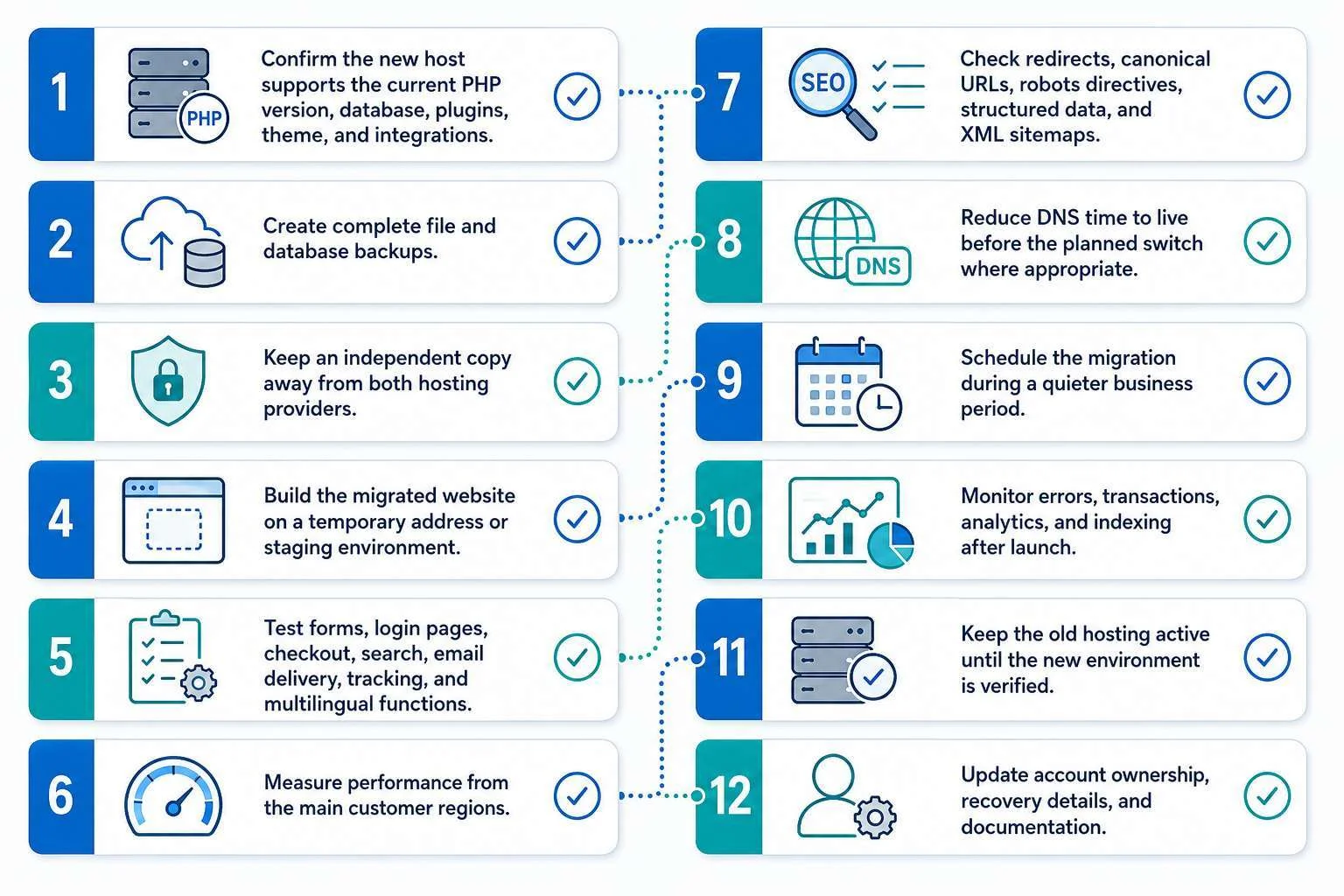
Use this sequence before moving a business website.
- Confirm the new host supports the current PHP version, database, plugins, theme, and integrations.
- Create complete file and database backups.
- Keep an independent copy away from both hosting providers.
- Build the migrated website on a temporary address or staging environment.
- Test forms, login pages, checkout, search, email delivery, tracking, and multilingual functions.
- Measure performance from the main customer regions.
- Check redirects, canonical URLs, robots directives, structured data, and XML sitemaps.
- Reduce DNS time to live before the planned switch where appropriate.
- Schedule the migration during a quieter business period.
- Monitor errors, transactions, analytics, and indexing after launch.
- Keep the old hosting active until the new environment is verified.
- Update account ownership, recovery details, and documentation.
Final Thoughts
The best WordPress hosting for international business is the provider that fits your real audience, website workload, technical capacity, and commercial risk.
Kinsta is a strong overall choice for established businesses that want polished managed hosting and flexible global server placement. WP Engine is particularly valuable for teams with structured development workflows. Rocket.net offers a straightforward edge focused setup, while SiteGround gives smaller businesses a practical managed option.
Cloudways provides more infrastructure freedom for technical teams. Hostinger works well when budget matters and the website remains relatively straightforward. A managed cloud VPS becomes appropriate when standard WordPress plans no longer provide the control or resources the project requires.
Do not select hosting from a feature list alone. Identify where your customers are, understand which pages can be cached, estimate the cost of downtime, review backup recovery, and test support before committing.