

Publishing a page does not mean Google or another search engine will immediately find it, store it, or show it to searchers. To understand why a useful page can remain invisible, you need a practical view of how search engines work from URL discovery to the final search results.
This guide explains crawling, rendering, indexing, and ranking in plain language. You will learn what search engines need at each stage, why pages sometimes disappear from organic search, and how website owners can diagnose the correct problem before changing content or code.
What a search engine actually does
A search engine is not a live window into the entire web. It maintains an index, which is an organised collection of information gathered from web pages and other resources. When someone searches, the engine retrieves possible matches from that index and applies ranking systems to choose an order.
A page can exist online and remain absent from search because it was never discovered, could not be crawled, was not selected for indexing, or did not rank strongly enough to become visible. A working knowledge of how search engines work helps isolate which failure is responsible.
Google describes Search as an automated process in which crawlers discover pages, systems process suitable content, and ranking systems serve results. Its official guide to how Google Search works also makes an important limitation clear. Meeting technical requirements does not guarantee crawling, indexing, or ranking.

How search engines work from discovery to results
The familiar explanation is crawl, index, rank. That is useful, but rendering often sits between crawling and indexing, especially on sites that rely heavily on JavaScript.
| Stage | What the search engine does | Typical website problem |
|---|---|---|
| Discovery | Finds URLs through links, sitemaps, feeds, and submissions | The page is orphaned or missing from the sitemap |
| Crawling | Requests the URL and downloads available resources | Robots rules, server errors, or redirect loops block access |
| Rendering | Processes HTML, CSS, and JavaScript | Important content appears only after a script or user action |
| Indexing | Analyses content, duplication, language, and canonical signals | The page is thin, duplicated, noindexed, or not canonical |
| Ranking | Compares indexed pages for a query | A competing page is more relevant, useful, trusted, or usable |
This model prevents a common mistake. A ranking tool cannot explain why a page was never indexed, and an indexing request cannot repair a page that does not satisfy search intent. Knowing how search engines work at this level helps you choose evidence and fixes that match the affected stage.
Crawling: how search engines discover and fetch URLs
Crawling begins with known URLs. In practical terms, how search engines work starts with following crawlable links, reading XML sitemaps, checking feeds, revisiting known pages, and receiving supported URL submissions.
Googlebot is Google’s crawler, while Bing uses Bingbot. Both make ongoing decisions about which URLs to request, when to return, and how much attention a site or section deserves.
Internal links support discovery
Internal links help people navigate, but they also give crawlers routes through a website. They communicate which pages are connected and which pages receive prominence within the site structure.
Imagine publishing a service page with no link from the menu, related articles, category pages, or sitemap. The URL may eventually be found through an external link or manual request, but the website itself is offering weak discovery signals.
This is why how search engines work for website owners begins with architecture. Important pages should be reachable through normal links, not hidden behind search boxes, scripts, or isolated landing page URLs. The Mahmud Jibon SEO service page shows how technical audits, site structure, and organic visibility connect in practice.
XML sitemaps help, but do not guarantee indexing
An XML sitemap lists URLs that a site considers important. It is particularly useful for new sites, large shops, publishers, and pages that are difficult to reach through normal navigation.
Google’s official sitemap guidance recommends listing canonical URLs that you want to appear in search. A sitemap supports discovery and monitoring, but it does not force an engine to crawl or index every entry.
Keep redirects, noindex pages, duplicate parameters, and low value archives out of the sitemap. Conflicting entries make technical diagnosis harder.
Robots.txt controls crawling, not reliable removal
The robots.txt file tells compliant crawlers which paths they may request. It is a crawl control, not a dependable way to remove a page from search.
A blocked URL can sometimes appear without a useful description if the engine discovers it through links but cannot crawl the content. When a page must stay out of search, use the correct noindex method while allowing access, or protect private content behind authentication.
Google’s crawling and indexing documentation covers robots rules, redirects, sitemaps, mobile pages, and crawler management. Review the relevant guidance before applying broad disallow rules.
Crawl budget is mainly a large site concern
Crawl budget matters most for sites with huge URL inventories, rapid changes, extensive faceted navigation, or server limits. A small service website is more likely to suffer from weak links, duplicate URLs, accidental blocks, or unstable hosting.
Do not turn every indexing problem into a crawl budget project. The correct diagnosis should reflect the size and behaviour of the site, which is a more accurate view of how search engines work across different websites.

Rendering: what happens when JavaScript builds the page
Some pages expose their main content in the initial HTML. Others use JavaScript to insert product descriptions, prices, links, reviews, or navigation after loading.
Rendering is the process of executing enough of the page to understand its visible content and structure. This part of how search engines work is easy to overlook. Google can render JavaScript, but essential information should not depend on fragile scripts when a server rendered option is available.
Google’s JavaScript SEO basics explain how rendering affects links, metadata, canonical tags, and robots directives.
Consider a product page where the name and image appear in HTML, but the description and related product links load from an application programming interface. The page looks complete in a browser. If the request fails for a crawler, the rendered version may contain little useful content.
The URL Inspection tool in Google Search Console can show the indexed version, test a live URL, display rendered output, and report loaded resources. Google’s URL Inspection documentation is a better starting point than assuming your browser view is identical to the crawler view.

Indexing: how pages become eligible for search
After crawling and rendering, the search engine analyses the page. It may examine the main content, headings, links, images, structured data, language, duplication, and canonical signals.
Indexing is selective. A crawler visit does not mean the URL will become a searchable result. At this stage of how search engines work, eligibility and canonical selection matter as much as discovery. This is one of the most important points for beginners.
Why a crawled page may not be indexed
A page may remain outside the index because it contains a noindex directive, duplicates another page, returns an unsuitable status, offers little distinct value, depends on unavailable resources, or is treated as an alternate version of another URL.
Some exclusions are correct. Cart pages, account areas, internal search results, duplicate filters, and staging pages usually should not appear in organic search. A healthy site does not need every known URL indexed. It needs the correct URLs indexed.
Canonical tags are strong hints
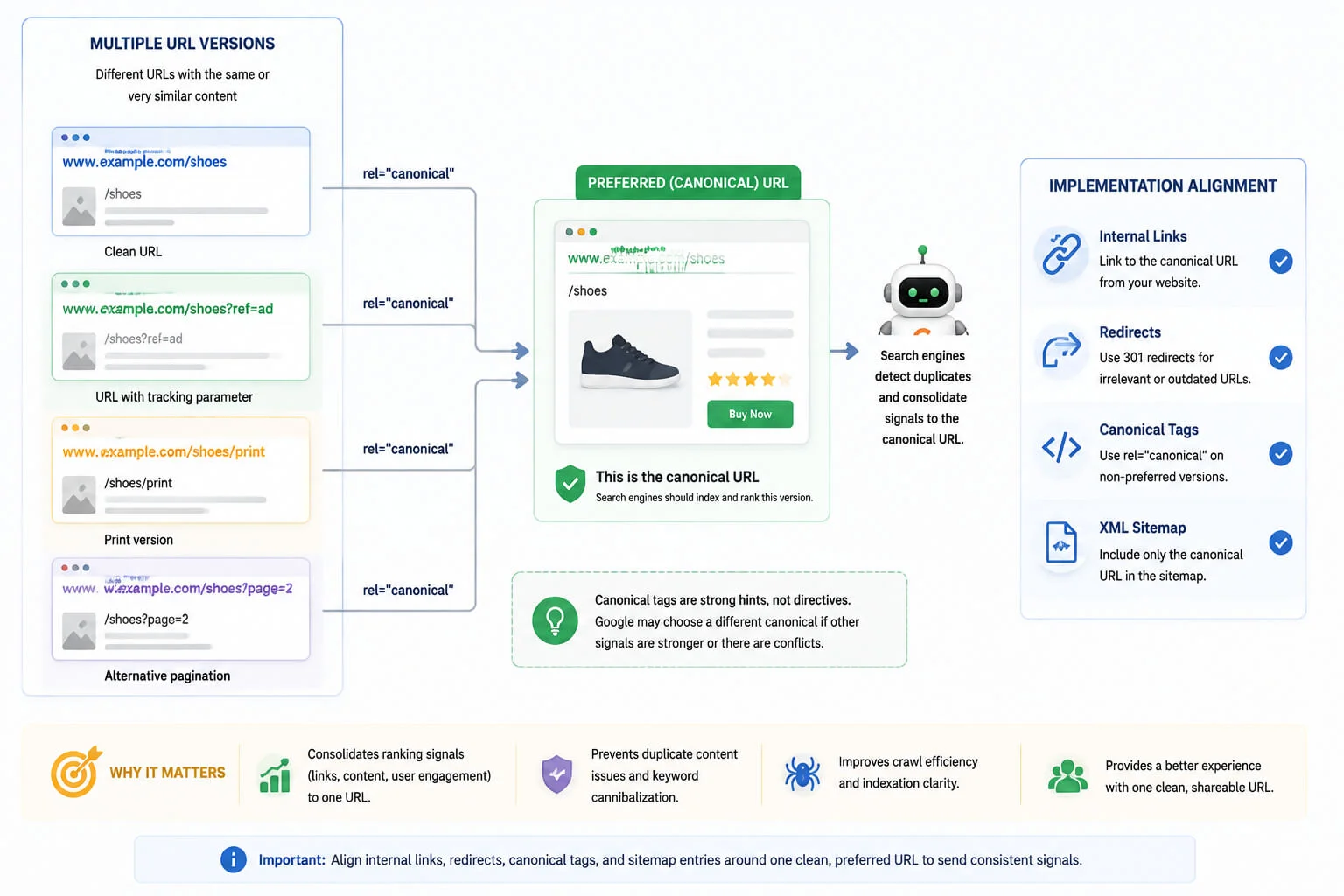
A canonical tag identifies a preferred version of duplicate or highly similar content. It is useful when tracking parameters, print versions, product variants, or syndicated content create several accessible URLs.
Google’s canonicalisation guidance explains that redirects, canonical annotations, and sitemap inclusion influence selection. Google can choose a different canonical when signals conflict.
Suppose a category is available through three URLs. One is linked internally, another appears in the sitemap, and a third is declared as canonical. The implementation is sending three preferences. Align internal links, redirects, canonicals, and sitemap entries around one clean URL.
Platform choices can make this easier or harder. The guide to WordPress and other content management systems offers useful context on platform flexibility, maintenance, and technical control
Ranking: how search engines choose an order
Ranking happens in response to a query. Understanding how search engines work at this stage means recognising that an indexed page does not receive one permanent position. The engine evaluates which pages best match the words, meaning, intent, location, freshness needs, and context of each search.
Google says its automated ranking systems use many signals and generally assess pages individually, while some site level signals also contribute. Its ranking systems guide discusses language understanding, freshness, links, original content, passages, reviews, and reliable information.
Relevance begins with intent
The query “how search engines work basics” suggests an educational explanation. “Technical SEO audit service” suggests commercial evaluation. “Why is my page crawled but not indexed” suggests troubleshooting.
Keyword repetition cannot turn one intent into another. Strong pages make their purpose clear through titles, headings, content, links, and the questions they answer.
Quality is comparative
A page competes with other indexed results that may be clearer, more complete, better supported, or more current.
For this topic, a useful page should explain the connection between crawling, rendering, indexing, and ranking. It should also clarify that robots.txt is not noindex, sitemap submission is not a guarantee, and speed does not override relevance.
Google’s Search Essentials recommend helpful content, crawlable links, descriptive language in prominent locations, and suitable technical controls. These are foundations, not a guaranteed ranking formula. For a practical example of clear structure and trust signals, review the WordPress agency website checklist.
Links and context influence results
Links help engines discover pages and understand relationships. Relevant editorial links may also contribute to assessments of importance and reputation. Context matters too. Location affects local searches, while freshness matters far more for breaking news than for a stable definition.
Two people can therefore see different results for the same words because language, device, location, and settings affect what is served.
Core Web Vitals support page experience
Core Web Vitals measure loading performance, responsiveness, and visual stability through Largest Contentful Paint, Interaction to Next Paint, and Cumulative Layout Shift.
Google recommends good results and states that Core Web Vitals are used within ranking systems. It also warns that perfect scores do not guarantee top positions. The current Core Web Vitals guidance should be checked before implementation because metrics and thresholds can change.
Fix slow response, unstable layouts, and long waits because they harm users. Do not remove valuable content solely to chase a perfect laboratory score when real user data shows acceptable performance. That balance reflects how search engines work in practice, where relevance and experience are considered together.

Why how search engines work matters for SEO
Understanding the pipeline improves prioritisation. It stops a writer from rewriting a blocked page, a developer from requesting indexing for a duplicate URL, and a business owner from buying links for content that does not answer the query.
A sensible order is:
- Confirm that the preferred URL exists and returns a successful response.
- Check that crawlers can reach it through links and are not blocked.
- Verify that essential content appears in rendered output.
- Confirm indexing permission, canonical signals, and index status.
- Compare the page with the search intent and competing results.
- Improve content, internal links, reputation, and usability where evidence supports the change.
This is where how search engines work SEO becomes practical. Each action is tied to a specific stage.
Example: impressions but no clicks
If Search Console shows impressions, the page is already indexed and being served for some queries. Crawling is probably not the main issue. Review the queries, ranking positions, title, snippet, intent match, and competing results.
Example: crawled but not indexed
Inspect content value, duplication, canonical selection, rendering, and technical directives before submitting the page again. Repeated indexing requests do not solve the reason for exclusion.
Example: unwanted parameter URLs
Identify which parameters change useful content and which create duplicates. Then align canonicals, internal links, sitemap rules, and platform controls. Large faceted sites usually need a tailored strategy rather than a copied robots file.

Common mistakes about how search engines work
Assuming publication equals indexing
Publishing makes a URL available. It does not guarantee discovery or inclusion. Add internal links, maintain a clean sitemap, and verify the result in webmaster tools.
Blocking a page and adding noindex
A crawler may need to fetch the page to see the noindex directive. If robots.txt blocks access first, the directive may not be processed.
Sending every URL in the sitemap
Sitemaps should highlight preferred indexable pages, not every URL a platform can generate.
Treating a canonical as a redirect
A canonical does not send users elsewhere and does not guarantee selection. Use a redirect when an old or duplicate URL should no longer remain independently accessible.
Expecting speed to rescue weak content
A fast page that misunderstands the query remains a poor result. Performance supports usability, but it cannot replace relevance.
Changing everything before diagnosis
Editing robots rules, canonicals, links, copy, and templates at the same time makes it difficult to identify what helped. Start with evidence and change the smallest relevant layer.
A practical diagnosis workflow for website owners
Begin with the exact URL, not the broad belief that the whole site is failing.
Use URL Inspection to check discovery, crawl status, indexing permission, last crawl, declared canonical, and Google selected canonical. Run a live test when recent changes are not reflected in the indexed version.
Review the Page Indexing report for patterns. A duplicate with the correct canonical may be expected. A sudden rise in server errors across important pages needs immediate attention.
Crawl the website with an auditing tool to compare status codes, robots directives, canonicals, depth, internal links, and sitemap inclusion. Use server logs when you need direct evidence of crawler visits or repeated failures.
Finally, compare the page with the actual search results. Technical eligibility gets a page into consideration. Relevance, usefulness, trust, and experience determine how strongly it competes.
A technical SEO audit from Mahmud Jibon can help when a problem crosses development, content, architecture, and performance. A useful audit should identify the affected stage, show evidence, and prioritise recommendations by impact and implementation risk.
Final Thoughts
The clearest way to understand how search engines work is to stop treating visibility as one event. A URL must be discovered, fetched, rendered when necessary, evaluated for indexing, and selected against competing pages for a specific query. That sequence is the foundation of how search engines work for website owners.
Website owners make better decisions when they diagnose the correct stage first. Strengthen discovery with clean architecture, protect crawl access, make essential content render reliably, align canonical signals, and create pages that satisfy real search intent.
Book a technical SEO audit with Mahmud Jibon to find where your pages are being lost between crawling, indexing, and ranking, and receive a prioritised plan for fixing the issues that matter.
Frequently asked questions
What are the basic stages of how search engines work?
The main stages are discovery and crawling, processing and rendering, indexing, and ranking. Simplified guides often combine discovery with crawling and rendering with indexing.
How long does it take a search engine to index a new page?
There is no fixed timetable. Important pages on established sites may be processed quickly, while new, weakly linked, duplicated, or low value pages can take longer or may not be indexed.
Does submitting an XML sitemap guarantee indexing?
No. A sitemap helps search engines discover preferred URLs and understand updates, but each engine decides what to crawl and index.
Can a page rank if it is not indexed?
No. A normal organic result must be in the search engine index before it can rank for a query.
What is the difference between robots.txt and noindex?
Robots.txt controls crawling. Noindex controls whether a fetched page should be included in search results. Blocking a page can prevent the crawler from seeing its noindex directive.
Do Core Web Vitals determine rankings?
Core Web Vitals are used within Google’s broader ranking systems and are valuable measures of user experience. They are not a standalone guarantee of a high position.
Why is my page indexed but not ranking?
Indexing only makes the page eligible. Weak intent match, limited value, stronger competitors, poor internal linking, low reputation, location mismatch, or freshness requirements can all limit ranking.