
Choosing a WordPress theme is no longer only about colours, layouts, and features. When you compare block themes vs classic themes, you are choosing how your website will be designed, edited, maintained, and extended.
That decision affects the whole team. It changes how marketers build landing pages, how developers manage templates, how consistently brand styles are applied, and how safely nontechnical users can make updates. A block theme may reduce dependence on custom template code. A classic theme may offer a more controlled and familiar workflow.
This guide compares both approaches in WordPress 7.1, with practical advice on the Site Editor, full site editing, theme.json, performance, accessibility, responsive design, maintenance, and migration risk. It will help business owners, marketing managers, agencies, designers, and developers decide whether to keep a classic theme, use a block theme for a new build, or plan a controlled migration.
What block themes and classic themes actually are
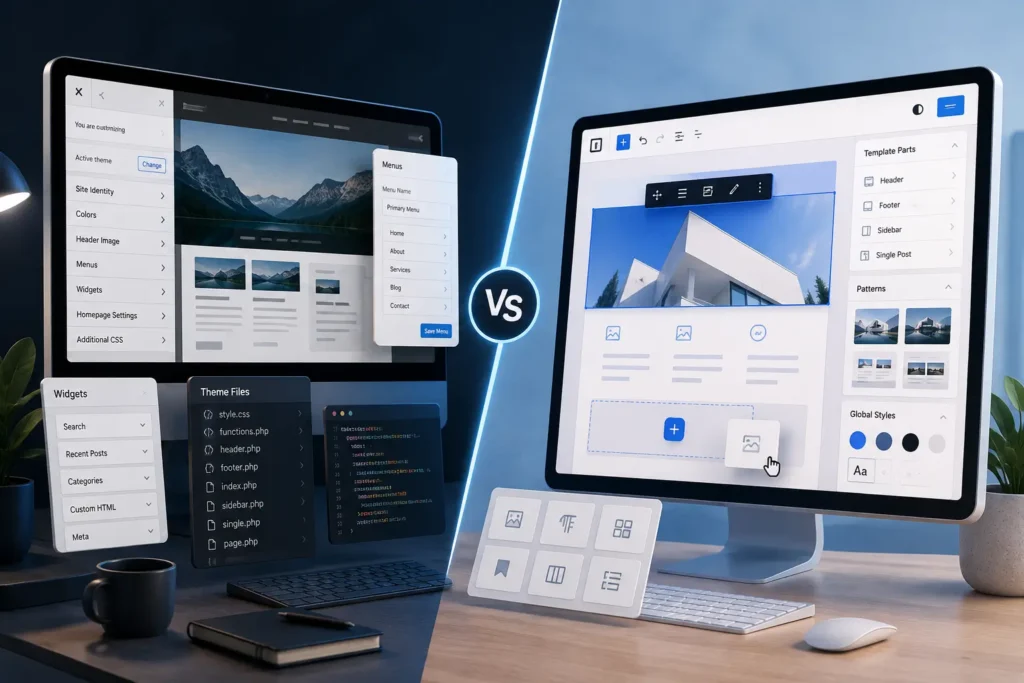
Classic WordPress themes use PHP template files to control pages, posts, archives, headers, footers, and other site areas. They commonly rely on the Customizer, widget areas, menu screens, theme options, functions.php, and custom CSS.
A classic theme can still use the block editor inside posts and pages. It can also use theme.json. Using Gutenberg blocks does not automatically make a site a block theme. Some people call modern options Gutenberg block themes, although the official name is simply block themes.
In WordPress theme architecture, block themes use block based templates for the wider site structure. Headers, footers, archives, search pages, and other templates can be edited through the WordPress Site Editor. This is the foundation of full site editing.
The official WordPress theme documentation explains that block themes use block templates, while classic themes are primarily built with PHP, JavaScript, and CSS. The difference in block themes vs classic themes is architecture, not appearance.

The role of theme.json
The theme.json file defines global settings and styles such as colour palettes, typography, spacing, layout widths, and available block controls. WordPress confirms that it works with both theme types, although it is especially important in block theme architecture.
This creates a useful middle option. A developer may improve a classic theme with theme.json without rebuilding every PHP template. That can deliver better editor consistency while reducing migration risk.
Block themes vs classic themes at a glance
| Decision area | Block themes | Classic themes |
|---|---|---|
| Design editing | Templates, patterns, and Global Styles can be edited in the Site Editor | Layouts are usually controlled through theme settings, the Customizer, code, or a page builder |
| Template structure | Block based HTML templates | PHP templates |
| Header and footer | Editable as template parts | Usually controlled by theme settings, widgets, code, or a builder |
| Global styling | Strong theme.json and Global Styles integration | CSS, theme options, the Customizer, and optional theme.json |
| Editor freedom | High unless controls are restricted | Usually more limited and predictable |
| Developer workflow | Blocks, patterns, templates, and configuration | PHP, hooks, filters, JavaScript, and CSS |
| Best fit | New builds, redesigns, native editing, reusable design systems | Stable custom sites, mature integrations, established builder workflows |
| Migration effort | May require rebuilding templates and content | None when the current architecture remains healthy |
A useful block themes vs classic themes comparison accepts that neither option wins every category. The right choice depends on who edits the site, what the current build relies on, and how much change the business can absorb.
Block themes vs classic themes in WordPress 7.1
When reviewing WordPress 7.1 themes, separate theme architecture from editor improvements. WordPress 7.1 continues the move toward more design control inside the editor. The release roadmap includes responsive styling, theme controlled breakpoints, clearer Site Editor navigation, additional Global Styles options, and new block design controls. Some details may still change before the final release.
The block themes vs classic themes direction in WordPress 7.1 does not make classic themes obsolete. It means WordPress block themes receive more native tools that can replace selected custom controls or third party add ons.
One confirmed example is minimum width support for blocks. Themes can enable it through theme.json, allowing suitable blocks to keep a usable minimum width. This is a small feature, but it reflects the wider direction. More design decisions are becoming part of the standard block system.

Block themes vs classic themes for design control and editing
Where block themes are stronger
Block themes suit businesses that want internal teams to manage more of the site without editing theme files. A marketer can update a header message, adjust a landing page template, change a footer call to action, or reuse an approved pattern from the same editing environment.
Patterns are valuable when sections repeat. A service business might create approved patterns for testimonials, service introductions, team profiles, pricing summaries, and contact prompts. Editors replace content without rebuilding the layout.
Global Styles can also make brand changes more efficient. A controlled typography or colour update can apply across the site instead of being repeated page by page.
The block themes vs classic themes decision becomes risky when freedom is not controlled. The main risk is excessive freedom. A poorly configured block theme may expose too many colours, spacing values, font sizes, and layout controls. Good implementation limits choices to the brand system and locks structural elements that editors should not change.
Where classic themes remain stronger
In a block themes vs classic themes review, classic WordPress themes can be the better choice when a website has mature custom functionality tied to PHP templates, theme hooks, custom fields, or plugin overrides.
Consider a membership site with conditional account pages and several custom templates. Rebuilding the visual layer with blocks may create little immediate value while introducing regression risk.
Classic themes also work well when design decisions should remain developer controlled. Some organisations want editors to change text and images, not templates, spacing, or navigation structure. A limited interface can protect consistency.
Familiarity matters too. A trained team may work faster with a stable classic theme. Changing tools without a clear business benefit can increase mistakes and support requests.
What about page builders
Many businesses use Elementor, Divi, Beaver Builder, or another visual builder with a classic or hybrid theme. That changes the decision.
A builder may already provide visual templates, responsive controls, reusable sections, and global settings. Moving to a block theme can reduce builder dependence, but builder pages rarely convert into clean native blocks automatically. The project may become a full rebuild.
For an established builder site, block themes vs classic themes is really a rebuild decision. Compare the expected maintenance savings with the cost of rebuilding pages, replacing builder features, testing integrations, and retraining editors.

H2: Block themes vs classic themes for performance and maintenance
In the block themes vs classic themes debate, neither architecture is automatically faster. Performance depends on hosting, plugins, images, fonts, scripts, caching, database work, and the quality of the theme.
Block architecture can support lean styling. WordPress can load styles for blocks used on a page, while theme.json can reduce the need for a large general stylesheet. Official WordPress developer guidance notes that block stylesheets can improve efficiency by loading a block’s CSS only when that block is present.
The advantage disappears when a theme adds heavy animations, oversized media, several block libraries, or unnecessary scripts. A lightweight classic theme can outperform a poorly built block theme.
Maintenance has a similar tradeoff. Block themes can centralise templates, patterns, and styles. However, Site Editor customisations may be stored in the database. If editors change templates without governance, the live site can drift from the theme files.
A professional workflow should define which changes belong in code, which may be made in the Site Editor, how template changes are reviewed, and how they move between staging and production.
A practical example
Imagine a consultancy with twelve service landing pages using the same hero, proof, testimonial, and contact sections.
A well built block theme can use locked patterns and shared style rules. The marketing team changes content while the structure remains consistent.
A classic theme can achieve the same result with custom fields and PHP templates. That may be safer when editors do not need layout control.
The block themes vs classic themes decision should give the team the right amount of control, not the largest number of controls.
Block themes vs classic themes for accessibility and mobile usability
The block themes vs classic themes choice does not guarantee accessibility. Both approaches can produce accessible websites, and both can create serious barriers.
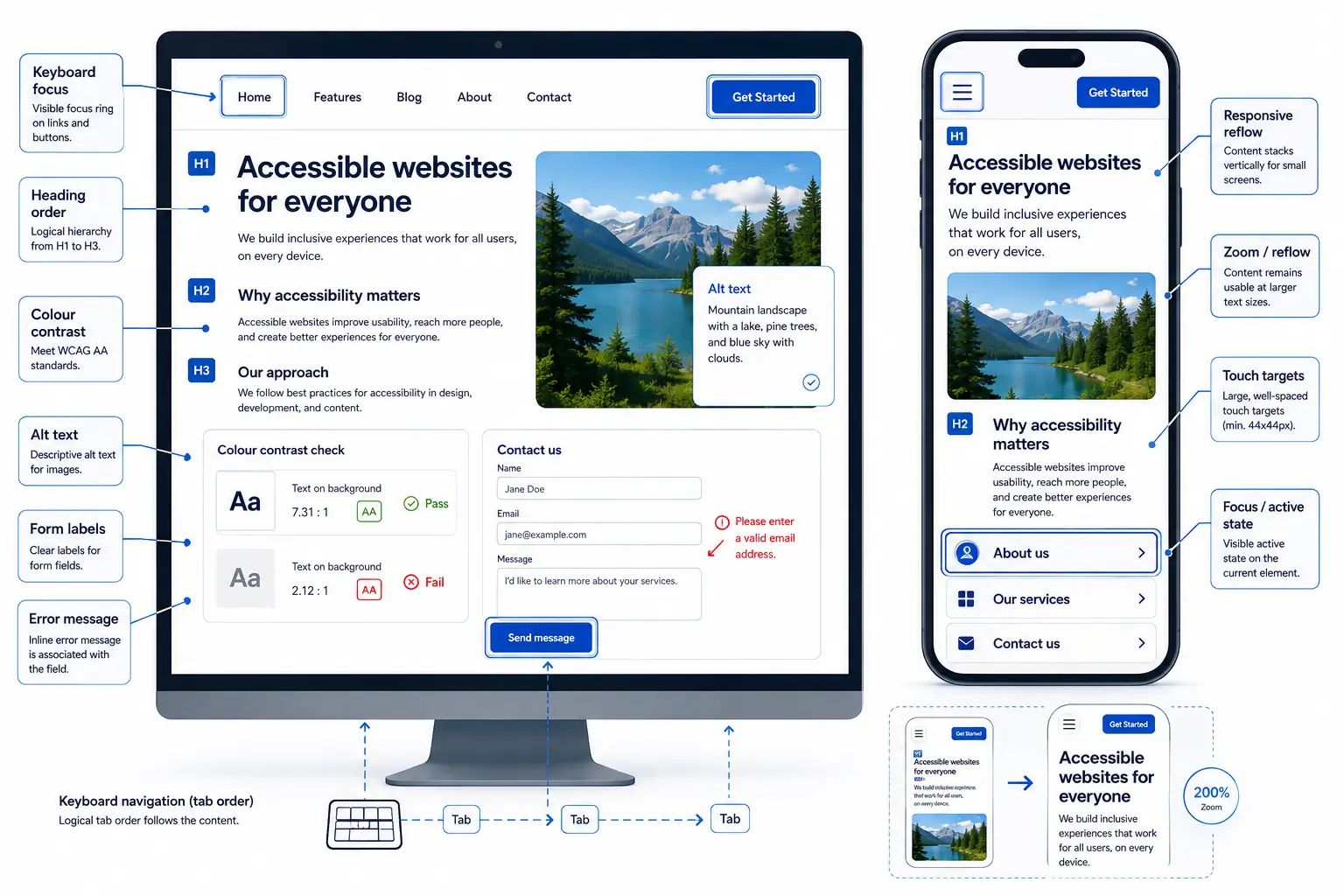
A block theme may encourage consistent semantic blocks, shared colours, predictable typography, and reusable patterns. These are useful foundations, but they do not replace testing.
Editors can still choose weak contrast, misuse headings, write unclear link text, omit alternative text, or place essential information inside images. Developers can still create keyboard traps, poor focus states, inaccessible menus, and layouts that fail when text is enlarged.
Older classic themes deserve careful review because their markup and components may predate current accessibility practices. An actively maintained classic theme can still meet strong standards.
Use the Web Content Accessibility Guidelines as the reference. Test keyboard navigation, visible focus, colour contrast, heading order, form labels, error messages, reflow, zoom, touch targets, and screen reader output.
Responsive design in WordPress 7.1
The WordPress 7.1 roadmap includes responsive style controls and theme configured breakpoints through theme.json. These tools can reduce custom CSS for typography, spacing, visibility, and layout changes across screen sizes.
The limitation in block themes vs classic themes responsive workflows is consistency. Editors need clear rules for responsive overrides, or each page may behave differently on mobile.
Preview controls are not enough. Test real pages at several widths, including long headings, translated content, forms, tables, checkout fields, embedded tools, and third party scripts.
Block themes vs classic themes for business websites
The block themes vs classic themes decision should be tied to an operational problem. A switch is worth considering when the current theme creates an operational problem. Common reasons include difficult updates, inconsistent layouts, shortcode dependence, limited mobile control, slow design changes, or a redesign that already requires new templates.
A block theme is also a strong choice for a new website when the team wants native WordPress editing, reusable patterns, a controlled design system, and less dependence on a large page builder.
Keeping a classic theme is sensible when the site is stable, fast, accessible, easy to edit, and supported by a reliable developer. Migration has a cost. Healthy architecture does not need replacement simply because another approach is newer.
Keep the current setup when critical plugins depend on theme templates, custom PHP logic is extensive, or the business cannot commit time for testing and training.
Mahmud Jibon’s WordPress development service explains how responsive behaviour, content management, and technical structure can be planned together. The UI and UX design service shows how user flows and mobile layouts can be tested before development.

Migration checklist after comparing block themes vs classic themes
Treat classic theme migration as a rebuild, even when the brand design remains similar.
- Audit PHP templates, custom fields, widgets, shortcodes, menus, builder templates, and plugin overrides.
- Record current performance, accessibility, rankings, conversions, and important user journeys.
- Map every page type, including archives, search, error pages, and custom post types.
- Test forms, ecommerce, memberships, multilingual tools, search, analytics, schema, caching, and security plugins.
- Decide what becomes a block, pattern, template, or template part.
- Define theme.json controls for colours, typography, spacing, widths, and editor permissions.
- Plan manual conversion for builder layouts, shortcodes, widgets, and custom HTML.
- Build on staging, then test content, devices, accessibility, integrations, and search settings.
- Train editors on patterns, locking, template access, media, revisions, and approvals.
- Prepare backups, a rollback plan, launch monitoring, and post launch support.
The Postify custom theme case study is a useful internal example of shaping theme decisions around a publishing workflow rather than a long feature list.

Common block themes vs classic themes mistakes
The first mistake is treating block themes as a no code solution. They reduce code in some areas, but professional builds still require technical judgement and testing.
The second is assuming classic themes are outdated. Some are poorly maintained. Others are efficient, secure, current, and well suited to the business using them.
Another mistake is choosing from a demo alone. A demo rarely reveals accessibility, editor usability, responsive edge cases, plugin compatibility, or performance with real content.
Businesses also underestimate governance. Giving every user access to templates and Global Styles can create accidental site wide changes.
Finally, teams migrate without improving weak content. A rebuild is the right time to remove obsolete pages, repair internal links, simplify navigation, and improve calls to action. The WordPress agency website checklist can help identify wider issues during planning.
Final Thoughts
The choice between block themes vs classic themes should follow the website’s operating needs.
Choose a block theme when you want native site editing, reusable patterns, central style controls, and an architecture aligned with current WordPress development. It is particularly suitable for new websites and planned redesigns.
In practical block themes vs classic themes decisions, keep a classic theme when it remains fast, accessible, secure, compatible, and easy to manage. A stable site does not need a disruptive rebuild simply because another architecture is newer.
For many businesses, the best next step is a structured review of the current theme, editor workflow, plugin dependencies, mobile usability, accessibility, performance, and maintenance cost. That review will show whether a block theme solves a meaningful problem.
Request a website review from Mahmud Jibon to assess your WordPress theme, editing workflow, responsive design, accessibility, performance, and migration risk before committing to a rebuild.
Frequently asked questions
Are block themes replacing classic themes in WordPress 7.1
No. Classic themes remain supported. WordPress is investing heavily in blocks, the Site Editor, Global Styles, and theme.json, but a well maintained classic theme can remain a sound business choice.
Can a classic WordPress theme use theme.json
Yes. WordPress documentation confirms that theme.json works with classic themes and block themes. It can improve settings and style consistency without a complete migration.
Do block themes improve website speed
They can support efficient style loading, but they do not guarantee speed. Theme quality, hosting, plugins, media, fonts, scripts, caching, and content choices still matter.
What are the main WordPress Site Editor benefits and limitations
Benefits include visual template editing, reusable patterns, template parts, and Global Styles. Limitations include a learning curve, possible design drift, database stored customisations, plugin differences, and features that still require code.
Is full site editing suitable for a business website
Yes, when the theme has a clear design system, sensible locking, tested templates, staff training, and an approval process. It is less suitable when editors should only manage content.
How difficult is classic theme migration
Difficulty depends on custom templates, shortcodes, builder content, plugin overrides, custom fields, and page types. A brochure site may be straightforward. An ecommerce or membership site may require extensive rebuilding and testing.
Should a business website switch to a WordPress block theme now
Switch when there is a clear benefit, such as easier editing, a planned redesign, stronger design consistency, or lower maintenance friction. Keep the current theme when it already meets business, accessibility, performance, and maintenance needs.