
WordPress AI tools can speed up research, drafting, editing, image creation, SEO tasks, and routine website administration. They can also make every page sound as though it came from the same anonymous template. That is the real concern for most business websites. Saving time matters, but not when the result feels vague, repetitive, or disconnected from the way customers already know the brand.
This guide explains how to use WordPress AI tools as part of a controlled content workflow rather than an automatic publishing machine. You will learn how to choose the right type of tool, define a usable brand voice, assign human review, manage privacy and security risks, and decide which tasks should remain fully human.
The goal is to spend human attention where it has the greatest value.
What WordPress AI tools can and cannot do
WordPress AI tools appear in the block editor, page builders, SEO plugins, media libraries, automation systems, and customer support tools. Their practical uses usually fall into six groups.
- Content support, such as ideas, outlines, drafts, summaries, translations, and rewrites.
- SEO assistance, such as title options, meta descriptions, and content suggestions.
- Visual production, such as image generation, background changes, and variations.
- Development support, such as HTML, CSS, JavaScript, and code explanations.
- Website administration, such as categorisation and routine content updates.
- Customer interaction, such as chatbots based on approved website information.
The Jetpack AI Assistant documentation covers generating, rewriting, translating, shortening, and expanding content inside WordPress blocks. Elementor documents AI support for text, images, and code, including per user access controls. Yoast and Rank Math focus more closely on metadata, content suggestions, and SEO workflows. These products overlap, but they are not interchangeable.
What they cannot decide reliably is what your business genuinely believes, whether a claim is commercially or legally sensible, or when technically correct copy still sounds wrong for the brand. WordPress AI tools work best with bounded tasks such as rewriting an approved paragraph, suggesting titles, or structuring notes. They are much less dependable when asked to research, write, approve, and publish a complete expert page in one pass.

Why brand voice disappears in automated workflows
Brand voice is not a tone dropdown. Choosing professional, friendly, or confident is rarely enough. A useful voice includes vocabulary, sentence rhythm, point of view, level of detail, commercial restraint, and the types of claims the business is willing to make.
AI output becomes generic for three common reasons.
First, the prompt contains little useful context. A tool cannot reproduce a distinctive voice from a company name and a topic. It needs examples, limits, audience information, and a clear purpose.
Second, teams ask AI to complete too much of the work in one pass. Research, argument, drafting, fact checking, editing, and SEO are separate tasks. Combining them into one instruction hides errors and makes review harder.
Third, nobody owns the final decision. When the writer assumes the editor will fix it, the editor assumes the subject expert approved it, and the website manager trusts the plugin score, weak content reaches publication.
The problem is therefore not AI alone. It is an undefined process. A good AI content workflow makes ownership visible at every stage.
How to choose WordPress AI tools for business content workflows
The best WordPress AI tools for business content workflows fit a defined job without adding unnecessary access, cost, or editorial complexity. Start with the task, not the plugin catalogue.
Choose by task fit
For drafting and rewriting, choose a tool that works inside the editor your team already uses and makes the original text easy to compare with the suggestion. Jetpack AI Assistant suits block based editing, but adding a large platform for one writing feature may be excessive.
For page copy, visual concepts, and small code tasks, Elementor AI guidance shows how its features sit within Elementor. That convenience matters only when the site already uses Elementor.
For titles, descriptions, and on page suggestions, Yoast AI features and Rank Math Content AI work inside their respective SEO systems. Use one established SEO workflow. Several overlapping AI SEO tools WordPress teams install can produce conflicting advice and interface clutter.
Chatbots, bulk publishing, and AI website automation carry greater risk because the system may communicate with customers or change live content. These uses need approved source material, access controls, logs, fallback behaviour, and a route to human support.
Check governance before convenience
Before installing WordPress AI plugins, confirm what data leaves the site, which service processes it, who can use the feature, whether output remains a draft, and whether activity and cost can be reviewed.
Also verify current pricing, usage limits, supported WordPress versions, data terms, and plugin compatibility. Use recognised sources, review update history, and test on staging. Mahmud Jibon’s WordPress development service can support the wider assessment when an AI feature affects the editor, theme, performance, permissions, or third party integrations.

Define brand voice before you write prompts
A brand voice document does not need to be long. It needs to be specific enough that different people can make similar editorial decisions.
Create a one page brief covering six points.
- Audience. Who is the content for, and what worries them?
- Position. What is the business known for, and what does it not claim?
- Voice traits. Define three or four traits in practical terms.
- Language rules. List preferred terms, banned phrases, spelling, and acceptable jargon.
- Evidence standard. Mark claims that need sources or specialist approval.
- Call to action style. Define how directly the brand asks readers to act.
A weak rule says, sound professional and friendly. A useful rule says, explain technical choices in plain language, avoid inflated promises, use direct second person language, and recommend the most suitable option even when it is not the most expensive.
Add approved and rejected examples. Rejected copy shows the boundary between concise and abrupt, confident and exaggerated, or helpful and sales heavy.
A practical brand prompt
Use a reusable instruction that separates permanent rules from the current brief. WordPress AI tools respond more consistently when these rules remain stable.
You are drafting content for a WordPress consultancy serving business owners and marketing managers. Write with calm authority and practical judgement. Use clear language, short paragraphs, and specific recommendations. Avoid inflated claims, generic introductions, and pressure based sales language. Explain tradeoffs. Do not invent features, statistics, prices, or results. Use supplied sources for factual claims. Save the result as a draft for human review.
Then add the page purpose, audience, search intent, approved sources, links, and call to action. Stable rules protect the voice while each page keeps a distinct purpose.

A responsible AI content workflow for a business website
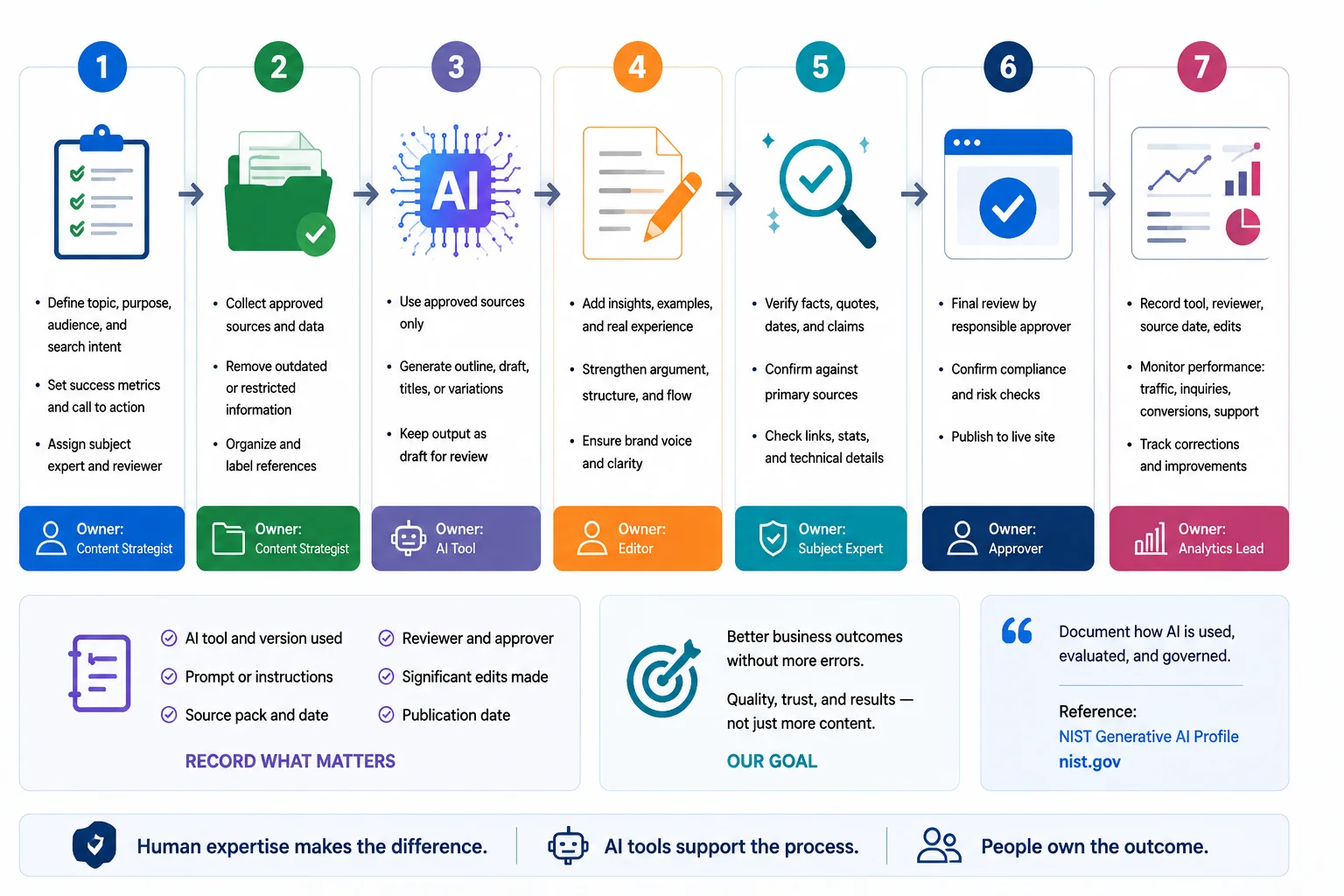
A responsible AI content workflow for a business website should speed up repeatable work while slowing down high risk decisions. The following sequence works for articles, service pages, landing pages, and product content.
1. Start with a human brief
Define the reader, page purpose, key question, intended action, subject expert, and evidence needed. A strong brief prevents the tool from choosing the argument for you.
2. Build an approved source pack
Collect current product information, service details, research, official documentation, and internal policies. Remove outdated material and mark anything that must not be used publicly.
For search content, Mahmud Jibon’s SEO service covers the technical and strategic work that sits beyond content generation.
3. Give AI one defined task
Ask for an outline, content gaps, title options, or a draft based only on approved material. Smaller tasks produce clearer outputs and make errors easier to trace.
4. Add human experience
Editors should add examples, decisions, caveats, and observations that could not have come from a generic source. This is where a complete draft becomes a useful page.
5. Verify factual claims
Check names, dates, capabilities, regulations, quotations, prices, and technical instructions against primary sources. Confidence is not evidence.
6. Complete brand and risk review
An editor checks voice and structure. A subject expert checks accuracy. Legal or compliance review is added where claims, regulated topics, or personal data create greater risk.
7. Publish, record, and measure
Record the tool, reviewer, source date, and significant edits for important pages. Monitor search performance, enquiries, conversions, support questions, and corrections. The objective is not more words. It is better business outcomes without more errors.
This logic reflects the broader principle of documenting how AI is used, evaluated, and governed. The NIST Generative AI Profile is a useful reference for organisations that need more formal controls.
WordPress AI content review checklist for marketing teams
Use this checklist before any AI assisted page is approved.
- Purpose. Does the page answer a real customer question or support a clear business decision?
- Accuracy. Has every factual statement been checked against a current, reliable source?
- Original value. Does the page include experience, examples, analysis, or judgement that is not simply a summary of other pages?
- Brand voice. Does the writing sound like the business, including its normal level of confidence and restraint?
- Specificity. Have vague claims been replaced with useful details?
- Search intent. Does the page satisfy the reason a reader searched, rather than merely include keywords?
- Internal links. Do links guide readers to relevant services or supporting resources?
- Accessibility. Are headings clear, link text descriptive, images useful, and alt text written for people?
- Risk. Does the content include legal, medical, financial, safety, privacy, or performance claims that need specialist review?
- Publication control. Is the content still a draft until the responsible reviewer approves it?
Place the checklist inside the WordPress editorial process or approval form so the team actually uses it.
AI image generation WordPress teams can use without losing visual consistency
AI image generation WordPress features are useful for early concepts, simple supporting graphics, background variations, and visual placeholders. They are less dependable for exact products, technical diagrams, recognisable people, brand assets, or any image where accuracy matters.
Keep a visual brief beside the written voice guide. Define photography style, composition, lighting, colour treatment, acceptable illustration styles, logo rules, and subjects to avoid. Save prompt records for important assets and check the vendor’s current usage terms before commercial publication.
Generated visuals also need a normal editorial review. Look for incorrect hands, text, product details, reflections, uniforms, tools, safety equipment, signage, and cultural context. An image can appear polished while still being factually wrong.
Each visual should explain a process, show a real example, support comparison, or clarify a decision.

Use AI SEO tools WordPress offers without writing for the plugin
AI SEO tools WordPress plugins provide can help with titles, descriptions, keyphrase placement, summaries, and content suggestions. They are useful assistants, but their scores are not evidence that a page deserves to rank or convert.
Google’s guidance focuses on helpful, reliable, people first content, regardless of production method. It warns against extensive automation used mainly to create search focused pages without meaningful value, and says disclosure can be useful where readers would reasonably ask how content was created. Review the people first content guidance and the guidance on AI generated content before scaling publication.
Use SEO suggestions after the argument and evidence are sound. Titles should describe the page accurately, descriptions should help readers judge relevance, and keywords should fit naturally. When a plugin suggestion makes the writing awkward, the writing should win.
A sensible workflow keeps WordPress AI tools in a supporting role.
- A human defines the topic, audience, intent, and original value.
- AI supports outlines and metadata options.
- A writer adds examples and evidence.
- The SEO tool checks basic on page signals.
- An editor rejects suggestions that reduce clarity or accuracy.

Security, privacy, and permissions for WordPress AI integration
Every WordPress AI integration adds a data flow, account, permission, or dependency. Treat it as a website change, not merely a writing feature.
The official WordPress security hardening guidance recommends trusted sources, limited access, current software, and reliable backups. Apply the same principles to WordPress AI plugins. Install only what the team needs, remove abandoned tools, and test changes before they reach the live site.
Privacy matters because prompts may contain customer details, unpublished plans, internal documents, or personal data. The WordPress privacy documentation explains that its privacy tools cannot identify every external service or data flow. Site owners must still understand what plugins and third party systems process.
Set practical rules.
- Do not paste confidential or personal information into an AI tool without approval.
- Store API keys securely.
- Give AI access only to roles that need it.
- Keep high value content in draft until a reviewer approves it.
- Maintain backups and activity logs for automated changes.
- Test chatbots with misleading and incomplete inputs.
- Provide a human contact route when automation is insufficient.
Use per user controls where available. Elementor, for example, documents the ability to disable AI functionality for individual users.

Common mistakes that weaken responsible AI content
Publishing the first output
The first response often contains generic framing, repetition, or unsupported certainty. Keep it as a draft and edit from the reader’s perspective.
Using one prompt for every page
Different page types need different evidence, structure, and calls to action. Reusing one prompt creates a recognisable formula.
Allowing SEO scores to control the prose
A green indicator cannot judge commercial accuracy, originality, or trust. Use it as a diagnostic signal, not an editorial approval.
Installing overlapping WordPress AI plugins
Overlapping tools may duplicate features, data flows, and advice. Choose one primary tool for each task and review the stack regularly.
Automating before the manual process works
AI website automation will not repair unclear ownership or poor sources. Define the manual process first, then automate stable steps.
Measuring output instead of results
Output volume is not the final goal. Track corrections, engagement, qualified enquiries, conversion quality, support burden, and maintenance time.
How to introduce WordPress AI tools gradually
A controlled pilot is more useful than a large rollout.
Phase 1. Select one low risk use case
Begin with outlines, title options, metadata drafts, or rewriting approved copy. Avoid automatic publishing and customer facing automation.
Phase 2. Compare quality and effort
Review a representative sample. Measure time saved, editing required, repeated errors, and whether the final content matched the brand voice.
Phase 3. Write the rules
Document approved tools, allowed data, prompts, review roles, disclosure decisions, and tasks that remain human. Keep the policy usable.
Phase 4. Expand only when the process is stable
Add another use case only after the first works consistently. Move from lower risk assistance to more consequential tasks gradually.
Larger organisations can add procurement review, audit logs, and formal risk levels. Small teams still need clear ownership.
Final Thought
WordPress AI tools are most valuable when they reduce repetitive effort without taking control of the message. The right setup begins with a defined task, a clear brand voice, approved sources, limited access, and a named human reviewer.
Do not judge success by how much content the system generates. Judge it by whether the final pages are accurate, recognisable, useful, and easier to maintain. Start with one low risk workflow, measure the real editing burden, and expand only when the process proves dependable.
Plan a responsible WordPress AI workflow. If your content, SEO, design, and technical setup need to work as one system, contact Mahmud Jibon to discuss a practical WordPress plan built around your team, risks, and goals.
Frequently asked questions
What are WordPress AI tools?
WordPress AI tools are plugins, editor features, integrations, or services that use artificial intelligence to support content, SEO, images, code, administration, automation, or customer interaction. Their value depends on the task, input quality, and review process.
What are the best WordPress AI tools for content teams?
There is no single best choice. Jetpack may suit block editor teams, Elementor AI suits Elementor production, and Yoast or Rank Math support their own SEO workflows. Choose according to your editor, controls, data policy, and task. Verify current terms.
How can I use AI in WordPress without losing brand voice?
Create a practical voice brief, provide approved examples, divide work into smaller tasks, and require human editing. The prompt should define the audience, position, language rules, evidence standard, and call to action style.
Should AI generated WordPress content be disclosed?
Disclosure depends on context, reader expectations, AI’s role, and applicable requirements. Google’s guidance says it can be useful when readers may reasonably wonder how content was created. Use a consistent policy and seek specialist advice for high risk content.
Can WordPress AI tools publish content automatically?
Some tools can publish automatically, but that does not make it suitable. Keep human approval for service pages, product claims, expert advice, customer communication, and other content where an error could cause harm or loss of trust.
How should a small business start with WordPress AI integration?
Choose one low risk task, test it on a few pages, record the editing required, and define simple rules for data, access, sources, and approval. Expand only when results are consistent.