
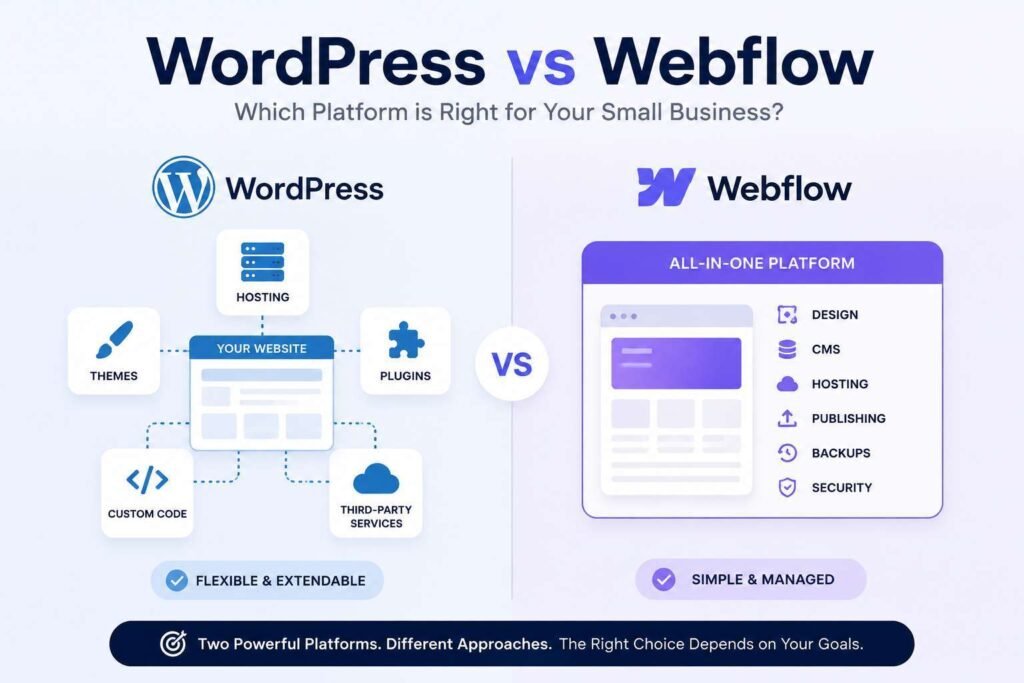
Choosing between WordPress vs Webflow is difficult because both can produce a polished business website. The real difference appears after launch. WordPress gives you an open source foundation with broad control, while Webflow combines visual design, content management, and managed hosting inside one platform.
This WordPress vs Webflow guide compares the two through the questions that matter to a small business: cost, SEO, ownership, editing, maintenance, integrations, and future growth. By the end, you should know which platform fits your team and where each option can create unnecessary risk.
The main difference between WordPress and Webflow
WordPress is open source content management software. With the self hosted version, you choose the hosting provider, theme, editing system, plugins, and technical support arrangement. The official WordPress features overview describes a flexible platform supported by a large theme and plugin ecosystem.
Webflow is a hosted software platform. The visual builder, CMS, hosting, publishing tools, backups, and many technical controls sit within one account. You make fewer infrastructure decisions, but you also work within Webflow’s plans, limits, and export rules.
That distinction shapes the entire WordPress Webflow comparison. WordPress lets you replace individual parts of the website stack. Webflow gives you a controlled environment with fewer routine technical decisions.
Neither model is automatically superior. A controlled platform can save time for a small team. An open platform can protect flexibility when a business expects complex content, specialist integrations, or custom features.
WordPress vs Webflow at a glance
Choose WordPress when your business needs extensive integrations, a large content library, advanced ecommerce, membership features, unusual workflows, or freedom to change hosting providers.
Choose Webflow when your priority is a visually refined marketing site, managed hosting, fewer maintenance decisions, and a design focused workflow within one platform.
For most service businesses, the deciding question is not which platform can create the better homepage. Both can. Ask which platform your team can manage reliably for the next three to five years.
WordPress is usually stronger for
- Content rich websites with many categories, authors, or custom content types.
- Businesses that need specialist plugins or custom backend functionality.
- WooCommerce stores with complex products, subscriptions, or fulfilment rules.
- Organisations that want control over hosting and server configuration.
- Companies that may need to move providers without rebuilding the whole site.
Webflow is usually stronger for
- Design led brochure sites and focused service websites.
- Teams that want hosting and platform maintenance handled together.
- Marketing sites with a controlled number of CMS collections.
- Businesses working with an experienced Webflow designer.
- Projects where visual precision matters more than a broad extension ecosystem.
WordPress vs Webflow design and website building experience
Webflow gives designers detailed visual control over layout, spacing, responsive behaviour, interactions, and reusable components. Its interface reflects concepts used in HTML and CSS, so experienced designers can build precise layouts without writing every line manually.
That power brings a learning curve. A business owner expecting a simple drag and drop tool may find the Designer interface technical. A well planned Webflow build should therefore separate routine content editing from structural design controls.
WordPress does not have one fixed design experience. A WordPress website builder may use the native block editor, Elementor, Bricks, a custom theme, or another framework. This gives the platform range, but quality depends heavily on the chosen method.
A disciplined WordPress build can be fast, consistent, and easy to edit. A poorly planned one can contain overlapping plugins, inconsistent templates, and pages that are hard to maintain. A WordPress vs Webflow choice based only on visual design is incomplete. Ask the developer to demonstrate how your team will update services, testimonials, locations, case studies, and articles.
Mahmud Jibon’s WordPress development service focuses on structured editing and long term management rather than treating a page builder as a substitute for website planning.
WordPress vs Webflow content management and team workflow
Webflow CMS works well when content follows clearly defined collections. A service business might create collections for services, locations, team members, case studies, and articles. Once those structures are configured, editors can add content without rebuilding the page.
The limitations become clearer when content is highly relational or operationally complex. Advanced permissions, unusual publishing rules, sophisticated search, and connected data may require external tools or custom work.
WordPress can be extended with custom post types, taxonomies, user roles, multilingual systems, editorial tools, and custom fields. This makes it a strong small business CMS when the website is expected to become a serious content and lead generation asset.
More flexibility creates more decisions. Someone must approve plugins, define the editor experience, and own ongoing updates. Adding a plugin for every new request is not a sustainable content strategy.
A useful test is to list ten changes your team expects to make each month. Ask the developer to demonstrate those exact tasks before you approve the build.

WordPress vs Webflow SEO and performance
WordPress vs Webflow is not an SEO contest with a universal winner. Google’s ranking systems guide explains that search visibility depends on many page and site signals. A CMS name does not replace useful content, crawlable architecture, internal linking, technical accuracy, and authority.
Webflow includes controls for titles, meta descriptions, canonical tags, sitemaps, redirects, robots rules, schema, and indexing settings. Its official SEO documentation shows that many standard tasks can be completed without installing an extension.
WordPress can support the same requirements and often goes further through SEO plugins, custom schema, advanced redirects, content tools, and specialist integrations. The tradeoff is that these components must be chosen and maintained carefully.
For a normal service business, both platforms provide enough SEO capability. Webflow often gives a clean baseline with fewer moving parts. WordPress has a higher extension ceiling when the strategy involves hundreds of landing pages, complex structured data, custom content relationships, or publishing automation.
The Webflow SEO comparison must also consider execution. A Webflow site can still have weak headings, thin service pages, heavy animation, and poor internal links. A WordPress site can still be slow because of oversized images, unnecessary scripts, and careless plugin choices.
Mahmud Jibon’s search engine optimization service addresses content mapping, indexing, technical structure, performance, and measurement rather than relying on the platform label.
Performance depends on the build
Webflow provides managed hosting and a consistent publishing environment, which reduces the number of performance variables a small business must supervise. Large media files, excessive interactions, and third party scripts can still slow the site.
WordPress performance depends on hosting quality, theme architecture, plugin choices, caching, image handling, and development discipline. This creates more responsibility, but it also allows the stack to be tuned for a specific audience or traffic pattern.
A sensible WordPress vs Webflow performance review should test realistic pages on mobile, not an empty template or a carefully selected homepage.
WordPress vs Webflow ownership and migration
Website ownership is often discussed too vaguely. Owning the domain is not the same as having a portable website. A business should know who controls the domain, hosting, CMS account, analytics, forms, backups, source files, integrations, and billing.
With self hosted WordPress, the website files and database can be moved between compatible hosting providers. A complete migration normally includes the database, media, themes, plugins, settings, and server configuration.
Webflow allows code export on eligible paid Workspace plans, but its official code export guidance states that CMS functionality, user accounts, ecommerce functionality, site search, form processing, and several hosted features are not included. Content can be exported separately, but moving a dynamic site may require rebuilding parts of the system.
This does not mean Webflow customers lack control. Sites can be transferred between accounts and content can be exported. It means platform exit planning should be discussed before the website becomes operationally important.
In a WordPress vs Webflow pricing and ownership comparison, WordPress usually provides the clearer migration route. Webflow provides convenience while the site remains within its environment.
WordPress vs Webflow website platform costs
Website platform costs should be measured as total operating cost, not only the monthly plan shown on a pricing page.
As of August 2026, Webflow lists its Basic Site plan at 15 US dollars per month with annual billing and its Premium Site plan at 25 US dollars per month with annual billing. Webflow changed its plans in May 2026, so verify current figures on the official Webflow pricing page before publication or purchase.
A Webflow budget may also include Workspace features, extra seats, localisation, premium templates, third party tools, custom code support, and designer assistance.
WordPress software is free, but a professional website still needs hosting, a domain, development, backups, security, maintenance, and sometimes paid themes or plugins. Its cost can be lower or higher than Webflow depending on the build and support arrangement.
Compare these items across three years:
- Initial design and development.
- Hosting, plans, licences, and subscriptions.
- Updates, backups, monitoring, and recovery.
- Routine content changes and technical support.
- Developer replacement risk.
- Migration or major feature expansion.
A cheap launch can become expensive when every change requires specialist help. A higher initial investment can be sensible when it creates reusable templates, reliable backups, clear editing controls, and useful documentation.

WordPress vs Webflow security and technical maintenance
Webflow handles platform updates, hosting infrastructure, SSL, and managed backups within its service. This reduces the number of routine technical tasks placed on the owner.
WordPress separates responsibilities. The host manages the server according to its service, while the site owner or maintenance provider manages WordPress core, themes, plugins, backups, testing, and recovery. Official WordPress update guidance recommends creating a current backup before important updates.
This does not make WordPress inherently unsafe. Security depends on governance. Reputable hosting, a controlled plugin set, protected administrator access, tested updates, reliable backups, and active monitoring can create a strong setup.
The common failure is launching WordPress without assigning maintenance responsibility. If nobody owns updates or tests backups, flexibility becomes an operational weakness.
WordPress vs Webflow scalability and future integrations
WordPress scalability is a genuine strength, but growth requires planning. The platform can support brochure sites, publications, ecommerce systems, memberships, learning platforms, directories, and custom applications. Larger builds may need better hosting, caching, database work, development standards, and ongoing technical management.
Webflow can support substantial marketing sites and content libraries, but businesses should check CMS item allowances, bandwidth, permissions, localisation, and integration requirements. Current plan limits may change, so they should be verified during website planning.
A growing service business should map likely future needs, including booking systems, CRM connections, quote calculators, customer portals, gated resources, multilingual content, new locations, recruitment pages, and marketing automation.
When those requirements are standard and limited, Webflow may remain efficient. When they are central to the business model or likely to become highly customised, WordPress is usually the safer long term foundation.
WordPress vs Webflow for a growing service business
For a consultancy, contractor, clinic, agency, or professional firm, both platforms can work. The decision depends on how the website will support sales and operations.
Choose Webflow when the site is mainly a marketing presentation with several services, a blog, case studies, and straightforward lead forms. It is especially suitable when a skilled Webflow professional will maintain the system and the business values managed hosting.
Choose WordPress when the strategy includes many service or location pages, specialist integrations, regular content growth, or new functionality. It is also a better fit when the owner wants hosting freedom and access to a broad global developer market.
This WordPress local service website case study shows how content structure, local SEO, calls to action, speed, and trust elements can be planned together.
When to choose WordPress instead of Webflow
WordPress is the stronger choice when several of these statements apply:
- Your website will publish a large and growing content library.
- You need complex ecommerce, memberships, directories, courses, or accounts.
- Your business depends on a specialist integration.
- You want control over hosting, database access, and backups.
- Custom functionality may become a competitive advantage.
- Migration flexibility matters more than a single managed platform.
The guide to WordPress compared with other CMS platforms is useful when Webflow is not the only alternative under review.
When Webflow is the better choice
Webflow is often the better decision when the scope is controlled and the visual brief is demanding. A small team may value having hosting, publishing, backups, CMS tools, and design controls under one provider.
It also reduces the temptation to assemble the site from many unrelated plugins. For a brand site with predictable content, that restraint can improve consistency and simplify support.
When neither platform fits
Webflow alternatives deserve consideration when the website has a specialised purpose. Shopify may suit a business where ecommerce operations are central. Squarespace or Wix may fit a simple brochure site where quick setup matters more than deep control. A custom application may be justified when the website is actually a software product with unique workflows.
The best CMS for small business is not always the platform with the longest feature list. It is the one that supports the business model without creating unnecessary technical weight.
Common WordPress vs Webflow selection mistakes
Choosing from design alone
Both platforms can look excellent. A homepage mockup tells you little about editing, integrations, backups, support, or future expansion.
Assuming the CMS solves SEO
SEO depends on research, structure, content, links, technical setup, and ongoing improvement. The platform only provides tools.
Ignoring post launch responsibility
Every site needs an owner for content, forms, analytics, updates, and support. Define those roles before development.
Treating every request as a plugin problem
Plugins are valuable, but each one creates another dependency. Review quality, compatibility, support, and long term value before adding one.
Failing to document account ownership
The business should control the domain, platform account, hosting, analytics, email delivery service, and payment details. A developer should receive access without becoming the only account owner.
A practical WordPress vs Webflow decision checklist
- Define the site’s purpose and desired visitor actions.
- List the content types you will publish during the next two years.
- Confirm every required integration.
- Decide who edits content and how often.
- Assign responsibility for maintenance, backups, and emergencies.
- Compare three year costs rather than launch prices.
- Ask what can be exported and what migration would involve.
- Test the real editing workflow before approval.
- Request mobile performance tests on realistic pages.
- Confirm that the CMS supports the next business stage, not only today’s site map.

Final Thoughts
The WordPress vs Webflow decision becomes clearer when you stop asking which platform is better in general. Webflow is an excellent fit for a focused, design led marketing site that benefits from managed hosting and a controlled system. WordPress is usually stronger for content depth, custom functionality, broad integrations, hosting freedom, and long term portability.
For a growing service business, WordPress is often the safer choice when the website will expand into a serious marketing or operational asset. Webflow can be more efficient when the scope is stable, the content model is straightforward, and the team wants fewer technical responsibilities.
Design matters, but ownership, workflow, support, and adaptability determine whether the platform remains useful years later.
Planning a new website or reconsidering your current platform? Request a WordPress consultation with Mahmud Jibon to review your goals, content structure, integrations, hosting needs, and long term growth plan before committing to a build.
Frequently asked questions
WordPress vs Webflow for a small business website, which is better
Webflow is often better for a focused marketing site with controlled content and a preference for managed hosting. WordPress is generally better when the business needs extensive integrations, custom functionality, content growth, or stronger portability.
WordPress vs Webflow SEO and performance
Both can support strong SEO. Webflow includes many technical controls within the platform, while WordPress offers broader extension through plugins and custom development. Strategy and implementation matter more than the CMS name.
Is Webflow easier to maintain than WordPress
Webflow usually requires less infrastructure maintenance because it manages hosting and core platform updates. WordPress needs a defined process for updates, backups, security, and testing, although managed services can reduce that workload.
Does WordPress provide better website ownership
Self hosted WordPress generally provides more control over files, the database, hosting, and migration. Webflow provides strong account and content control within its platform, but some dynamic features are not included in exported code.
Which platform is cheaper
There is no universal answer. Webflow has subscription pricing, while WordPress costs depend on hosting, development, plugins, maintenance, and support. Compare the full cost over several years.
Can a Webflow site be moved to WordPress
Yes, but the move may require rebuilding templates, importing content, recreating forms, setting redirects, and replacing Webflow specific features. The effort depends on the site structure and integrations.