
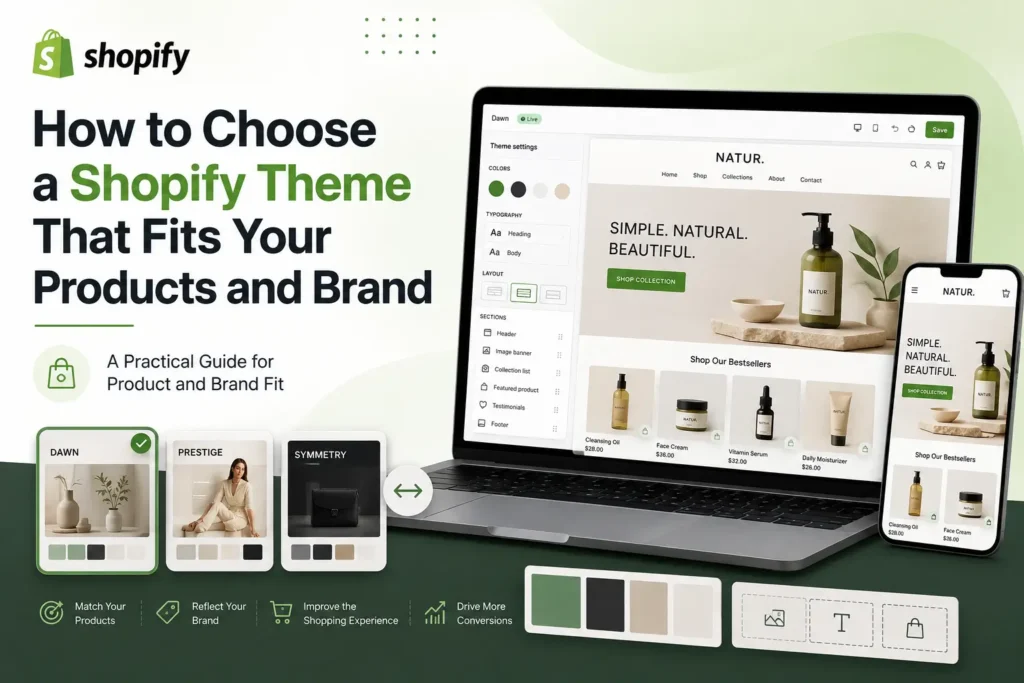
A theme can make a Shopify store look polished within minutes, yet the wrong choice often becomes expensive later. Product images feel cramped, filters are missing, mobile menus become awkward, and every new campaign requires another workaround. Learning how to choose a Shopify theme means looking beyond the demo store and judging how the theme will handle your real catalog, your brand rules, and the way customers actually shop.
This guide gives you a practical process for comparing Shopify themes without being distracted by sample photography or fashionable animation. You will learn how to define your requirements, test Online Store 2.0 flexibility, evaluate product and collection layouts, check performance and accessibility, and decide when a free theme, paid theme, or custom build makes sense.
Why the Theme Decision Affects More Than Appearance
A Shopify theme controls the presentation layer of your store. It shapes navigation, collection browsing, product pages, promotional sections, search interfaces, cart behavior, typography, and the way content adapts to different screens. It does not replace strong products or clear merchandising, but it can either support those strengths or make them harder to see.
A useful way to understand how to choose a Shopify theme is to treat it as the operating system for the customer experience. A visually quiet theme may suit a premium skincare line, while the same theme could frustrate shoppers in a parts store with hundreds of compatibility based products. The fit depends on what customers need to compare, understand, and do.
For a broader launch framework, Mahmud Jibon’s Shopify quick start guide explains how store structure, product pages, collections, speed, and checkout work together. Theme selection should support that whole journey, not sit apart from it.

How to Choose a Shopify Theme in Nine Practical Steps
The best practices for how to choose a Shopify theme begin before you open the Theme Store. Start with products and customer decisions, then use design as a filter. This prevents the common mistake of forcing a business into a beautiful layout built for a different type of store.
1. Define the Product and Catalog Requirements
To understand how to choose a Shopify theme for your catalog, write down what each product page and collection must do. A single product brand may need storytelling, video, comparison sections, subscriptions, and reviews. A large catalog may need predictive search, layered filtering, badges, quick purchase tools, swatches, and clear collection navigation.
Consider the shape of the product information. Apparel stores need size guidance, variant visibility, model details, and strong galleries. Furniture stores benefit from dimensions, materials, delivery details, room photography, and related collections. Technical products may require specifications, compatibility information, downloads, and comparison.
Create a list with three columns: essential now, likely within twelve months, and optional. This keeps a growing store from buying a theme that only fits its current catalog. It also prevents paying for a large feature set that the team will never use.

2. Map the Customer Journey Before Judging the Homepage
A key part of how to choose a Shopify theme is mapping the customer journey before judging the homepage. Buying decisions depend on collections, search results, product pages, cart interactions, and mobile navigation. Review those areas first.
Test three customer tasks. A first time visitor wants to understand the brand and find a suitable product. A returning customer wants to reorder quickly. A comparison shopper wants to check variants, shipping, returns, and reviews. Count unnecessary taps, unclear labels, hidden information, and moments that require guesswork.
A strong theme makes the next action obvious without filling every screen with buttons. It should also allow different routes through the store. Some shoppers browse by category, some search by product name, and others enter directly on a product page from an advertisement or search result.
3. Translate the Brand Into Practical Design Rules
Learning how to choose a Shopify theme for a brand starts with practical design rules, not the demo store’s mood. Demos use curated photography, short product names, controlled copy, and ideal image ratios. Real content behaves differently.
Turn the brand into specific rules. Decide whether the store needs generous whitespace or denser product discovery. Confirm type styles, image ratios, contrast, button shape, icon style, and the right amount of storytelling. A playful children’s brand and a clinical supplement brand may both use bright colors, but their hierarchy and trust signals should differ.
Test the logo in the header, not only on a mood board. Wide logos, detailed marks, and long navigation labels expose limitations quickly. When asking how to choose a Shopify theme, focus on whether it can express the brand consistently with real assets.
4. Prioritise Online Store 2.0 Flexibility
When deciding how to choose a Shopify theme, most new stores should prioritise the modern architecture known as Online Store 2.0. Its JSON templates let merchants add, remove, and reorder sections on many page types through the theme editor, reducing dependence on code for normal content work.
Do not treat the label alone as proof of flexibility. Open the theme editor and inspect the actual sections, blocks, templates, and settings. Shopify’s JSON template documentation explains the underlying structure, but the practical question is how thoughtfully the theme developer has exposed those options.
Check whether you can create distinct product templates. A skincare store may need different layouts for single products, bundles, and subscriptions. A furniture store may separate ready made items from custom orders. The theme should manage those differences without duplicating large amounts of code.

5. Compare Built In Features With Your App Plan
Knowing how to choose a Shopify theme also requires comparing built in features with your app plan. Native quick purchase, badges, banners, recently viewed products, swatches, or sticky cart controls can reduce app use. That can simplify maintenance, but more features are not automatically better.
Choose features that support a real need. A countdown timer suits a genuine limited promotion, but becomes distracting when permanent. Quick purchase may help repeat buyers in a simple catalog, yet it may be unsuitable when customers must review sizing or compatibility before ordering.
As part of how to choose a Shopify theme, list the apps you use or expect to add. Confirm support for app blocks where needed, especially on product templates. Compatible app blocks can be repositioned through the theme editor, which is cleaner than direct code changes. Ask about known conflicts instead of assuming every integration will work.
6. Test Real Products, Not Demo Content
A reliable step in how to choose a Shopify theme is testing real products before buying. Shopify lets merchants try paid themes, customize them in the theme editor, and preview them before purchase. Add the theme to your store with real products, collections, descriptions, and images. The official guide to adding, previewing, and buying themes explains which settings remain specific to each theme.
Include difficult examples. Test the longest product title, the largest variant set, an out of stock item, a discounted item, a product with only one image, and a collection with many filters. Check how long policy text, translated labels, and customer reviews affect the page.
Real content often reveals problems that a demo hides. Product cards may become uneven, mobile titles may wrap badly, badges may cover imagery, or the product form may push the purchase button too far down the screen. These are not minor cosmetic details. They shape how quickly a shopper understands the offer.
7. Review Mobile Shopping With Real Tasks
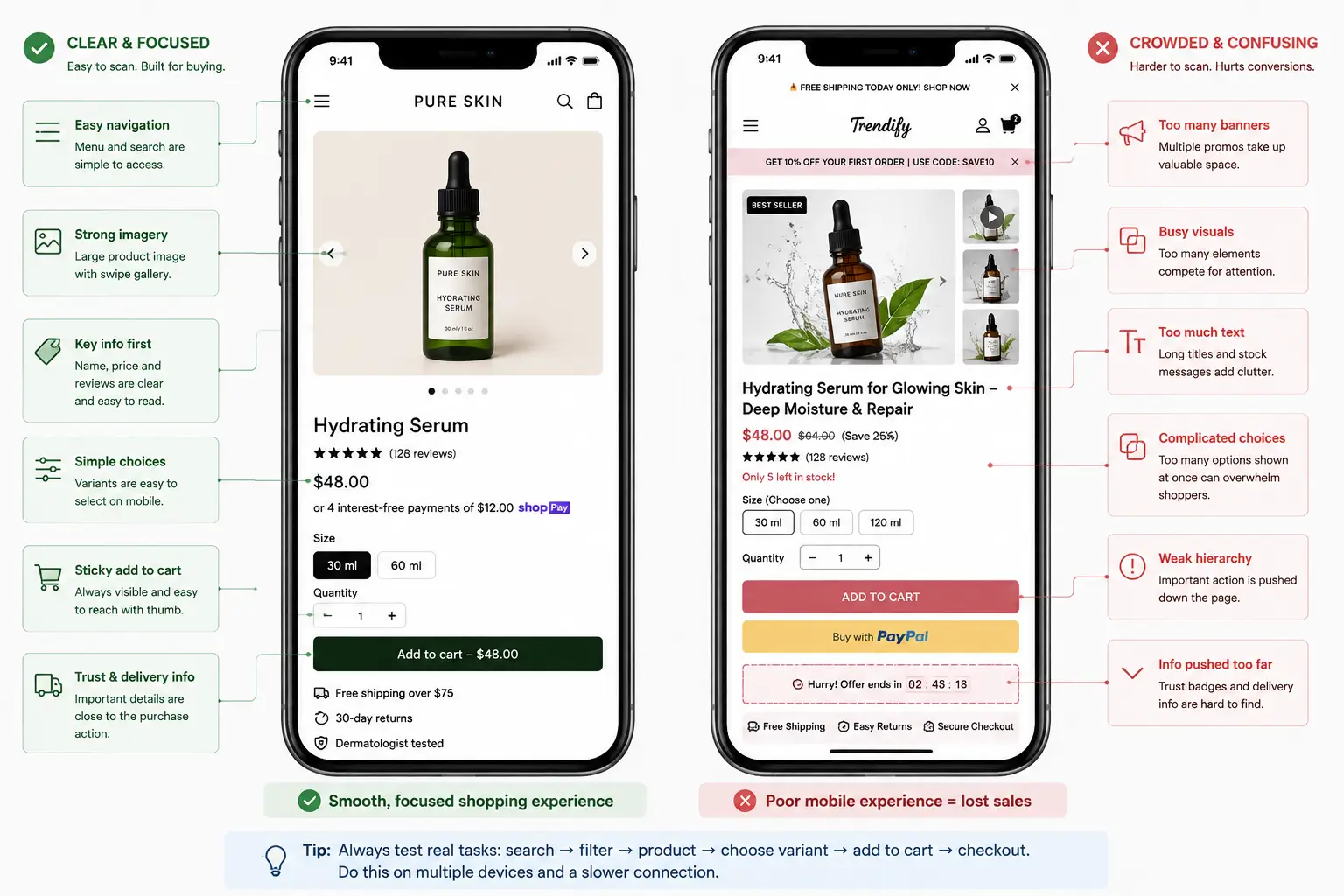
Any guide on how to choose a Shopify theme should treat mobile testing as a real shopping exercise, not a quick browser resize. Use actual phones where possible, test different screen sizes and a slower connection. The theme editor includes mobile preview, but touch targets, browser controls, keyboards, and apps affect the real experience.
Check menu depth, search, filters, image swiping, variants, sticky purchase controls, cart editing, forms, and support links. Important content must not depend on hover. Watch for announcement bars or popups that leave too little space for the product.
A mobile layout should not simply stack the desktop page. It should preserve the buying sequence. Customers usually need the product name, useful imagery, price, essential variant choices, delivery context, and a clear purchase action before secondary storytelling.
8. Check Performance and Accessibility Before Custom Work
Performance is central to how to choose a Shopify theme because a clean demo can slow down after images, scripts, apps, fonts, and campaign tools are added. Compare themes with similar content and essential apps, then test the homepage, collection page, and product page separately.
At the time of writing, Shopify’s Theme Store requirements state that submitted themes must meet minimum average Lighthouse performance and accessibility scores on benchmark home, product, and collection pages. Those thresholds help screen Theme Store submissions, but they do not guarantee that your finished store will remain fast or accessible after customization.
Use Core Web Vitals guidance from Google to review real user performance once the store has traffic. Check keyboard navigation, visible focus, contrast, form labels, errors, image alternatives, and zoom behavior against WCAG 2.2. Accessibility is part of whether customers can browse and buy.

9. Evaluate Support, Updates, and Maintenance Risk
Support and update risk are part of how to choose a Shopify theme. Review the developer’s documentation, release notes, support scope, and response process. Shopify advises merchants to understand the available support before buying a paid theme.
Ask how custom code affects future updates. Shopify warns that incompatible code changes may not carry into an updated theme copy. A theme that requires extensive edits to reach a basic requirement may cost more over time than a theme with a higher purchase price and better native controls.
Consider who will manage the store. A founder who updates the site once a month can tolerate a different workflow from a merchandising team launching weekly collections across several markets. The best theme is one the actual team can operate confidently without creating inconsistent pages or calling a developer for routine changes.
Free, Paid, or Custom Theme
Once you understand how to choose a Shopify theme from business requirements, the choice between free, paid, and custom becomes easier. The category changes the starting point, feature depth, support relationship, and level of control, but does not determine quality.
| Approach | Best fit | Main advantage | Main limitation |
|---|---|---|---|
| Free theme | New or focused stores with standard needs | Low initial commitment and a clean starting point | May need apps or development for specialised features |
| Paid theme | Growing stores that benefit from deeper native features | Can reduce setup time and app dependence | Purchase does not guarantee a perfect fit or unlimited support |
| Custom theme or major custom build | Distinctive or complex merchandising requirements | Greater control over structure and brand expression | Higher cost, longer delivery, and ongoing technical responsibility |
When a Free Theme Makes Sense
When deciding how to choose a Shopify theme on a limited budget, a free option can suit a focused catalog, a new brand validating demand, or a business with modest layout needs. It keeps the initial commitment low and provides a clean merchandising base.
The limitation appears when the team keeps adding apps or custom code to reproduce features already available in a more suitable paid theme. Free is economical only when the theme already supports the important parts of the experience.
When a Paid Theme Is Worth Considering
A practical answer to how to choose a Shopify theme is to consider a paid option when its sections, navigation, product features, and support save meaningful design and development time. Measure value against the cost of alternatives, not a free download alone.
Use the trial with your content before buying. Since features and policies can change, verify the current listing, licensing terms, support information, and update history before publication or purchase.
When Custom Development Is the Better Decision
Custom work becomes reasonable when the brand has a distinctive merchandising model, complex product logic, unusual content requirements, or a mature design system that existing themes cannot support cleanly. It may also be justified when repeated workarounds are already increasing maintenance risk.
Custom does not need to mean rebuilding everything. A strong existing theme can be used as a base when its architecture fits and the required changes are controlled. The decision should follow a documented gap analysis. For businesses still choosing a platform, Mahmud Jibon’s WordPress and Shopify comparison provides useful context on control, maintenance, and ecommerce focus.
Common Mistakes With Choosing a Shopify Theme
Knowing how to choose a Shopify theme also means recognising shortcuts that create trouble later.
Choosing by Industry Label Alone
Industry filters are useful for discovery, but they are not rules. A theme listed for fashion may work well for art prints, while a theme promoted for electronics may suit any large catalog with detailed filters. Judge the layout and features, not the category name.
Copying a Competitor’s Look
Competitor research can reveal familiar patterns and customer expectations. Copying the same theme, visual hierarchy, and promotional language usually weakens differentiation. Use competitors to identify table stakes, then make deliberate choices that fit your product and positioning.
Buying for Features That Should Be Apps or Operations
A theme should manage presentation and standard storefront interactions. It cannot fix unclear product information, poor photography, weak collection logic, or an unreliable fulfilment process. It also should not be selected mainly because it imitates a specialised app that your business depends on.
Ignoring International and Content Needs
International needs also shape how to choose a Shopify theme. Longer translations can break buttons, menus, and product cards. Currencies, language selectors, size systems, tax details, and delivery expectations can change layouts. Test the markets you plan to serve, not only the launch market.
Customising Too Early
Teams often begin changing code before they understand the theme’s native settings. This increases update risk and creates avoidable maintenance. Explore templates, sections, blocks, app embeds, and theme settings first. Use code when the business case is clear and the change is documented.

A Final Pre Purchase Checklist
Use the same checklist each time you decide how to choose a Shopify theme. Do not change the criteria because one demo looks attractive.
- Product and catalog requirements are documented.
- Homepage, collection, search, product, cart, and support flows have been tested.
- Real product titles, images, variants, descriptions, discounts, and stock states display correctly.
- Mobile navigation, filters, product forms, and cart editing are easy to use.
- The theme editor supports the templates, sections, blocks, and app placements the team needs.
- Essential apps have been checked for compatibility.
- Performance has been tested with realistic content and scripts.
- Keyboard access, contrast, labels, focus states, zoom, and error messages have been reviewed.
- Theme documentation, developer support, release notes, licensing, and update process are understood.
- The total cost of theme, apps, development, and maintenance fits the budget.
Final Thoughts
The clearest answer to how to choose a Shopify theme is to start with product complexity, customer tasks, brand rules, and the team that will maintain the store. Visual appeal matters, but it should sit inside a sound structure for discovery, product understanding, mobile purchase, performance, accessibility, and future updates.
Shortlist a small number of themes, add them to your store, and test them with the most difficult real content you have. The right theme will not remove every tradeoff. It will give the business a stable, understandable base that requires fewer compromises as the catalog and brand grow.
Request a Shopify design review from Mahmud Jibon to assess your shortlisted theme, product page structure, mobile experience, app requirements, and customization risks before you commit.
Frequently Asked Questions
What is the best way to learn how to choose a Shopify theme?
Begin with a written requirement list, then test two or three themes using real products and customer tasks. Compare collections, product information, mobile controls, theme editor flexibility, apps, performance, accessibility, support, and update risk. A demo is a starting point, not proof of fit.
Should a growing store use a free or paid Shopify theme?
A growing store can use either. A free theme works well when the catalog and merchandising needs are straightforward. A paid theme may offer better value when its native sections and product features replace several apps or custom changes. The decision should be based on total setup and maintenance cost.
How important is Online Store 2.0 when choosing a Shopify theme?
It is highly useful for most new stores because JSON templates, sections, blocks, dynamic sources, and app blocks can make content management more flexible. Still, the quality of implementation differs by theme. Inspect the actual editor controls and templates rather than relying only on the architecture label.
Can I test a paid Shopify theme before buying it?
Yes. Shopify currently allows merchants to try paid Theme Store themes, customize them in the theme editor, and preview them with store content before purchase. Verify the latest trial and licensing terms in Shopify’s official documentation because platform policies can change.
What are the most common mistakes with choosing a Shopify theme?
The main mistakes are choosing from the homepage alone, copying a competitor, ignoring real product content, overlooking mobile navigation, assuming every app will integrate cleanly, and adding code before exploring native settings. These choices increase redesign and maintenance work.
How often should a Shopify store change its theme?
There is no useful fixed schedule. Change the theme when the current design creates documented problems that cannot be solved responsibly through content, settings, apps, or controlled development. A theme change should address clear business and customer needs, not a desire to follow a visual trend.