
A polished theme demo can hide a slow, awkward website. If you are deciding how to choose a WordPress theme, treat the demo as evidence of design direction, not proof of performance. The real test begins when you add your own images, forms, analytics, products and content.
This guide will help you judge speed, responsive design, accessibility, editing, theme compatibility and long term ownership before you commit. You will also get a practical test process that works for free themes, premium themes, block themes and builder based designs.
What a WordPress theme controls, and what it does not
A theme controls the presentation layer of WordPress. It supplies templates, styling, layout rules and often scripts for elements such as navigation, galleries and interactive headers. Poor choices here can create excessive code, unstable layouts or an editing system that becomes costly to maintain.
The theme is only one part of performance. Hosting, plugins, media, fonts and third party scripts also affect loading time. A lightweight WordPress theme does not guarantee a fast website, but it gives the rest of the stack more room to work. Understanding that boundary is central to how to choose a WordPress theme without blaming it for every performance problem.
That distinction matters when comparing fast WordPress themes. An empty demo with compressed images may score well while your finished service page struggles. Judge the candidate within the system you intend to run, not in the seller’s controlled showcase.
How to choose a WordPress theme from business requirements
Start with the pages and actions the business needs. A five page consultancy site has different requirements from a magazine, membership platform or WooCommerce store. Choosing the most flexible theme available often adds controls that nobody will use.
Write down your essential page types, content types and visitor actions. Include the details your team will edit each week. If marketers create landing pages without a developer, editing speed matters. If the site publishes research, readable article templates deserve more weight than dramatic home page effects.
| Requirement | What the theme should support | Warning sign |
|---|---|---|
| Service business | Clear service, case study, team and contact templates | The design depends on animation to explain basic information |
| Online store | Reliable WooCommerce templates and tested checkout styling | Store support appears only in a marketing badge |
| Content publisher | Comfortable reading width, archives, search and author pages | The demo concentrates almost entirely on the home page |
| Marketing team | Reusable patterns with sensible controls | Every page needs manual spacing fixes |
| Regulated organisation | Strong keyboard use, contrast and structured content | Accessibility is mentioned without test evidence |
The best business WordPress theme is usually the least complicated option that meets the content model. This requirement led approach keeps how to choose a WordPress theme grounded in actual work. Extra features create more settings to learn, more combinations to test and more ways for future updates to cause trouble.
If your requirements are still unclear, review the scope of a professional WordPress development service and separate essential functionality from decorative preferences before shopping. Teams that need to define page structure and user journeys first can also review the UI and UX design service.
Decide how the site should be edited
Ask who will change content after launch and which editor they already understand. Editing tests are part of how to choose a WordPress theme that remains affordable after launch. A technically elegant theme can still be a poor choice if routine edits require specialist knowledge. Test common tasks such as changing a phone number, creating a service page, updating a footer and replacing a hero image.
Also decide how much design freedom editors should have. A small owner managed site may benefit from broad controls. A larger marketing team often needs guarded patterns, consistent spacing and a limited colour system so pages remain coherent.
Block themes, classic themes and block theme performance
A block theme allows headers, footers, templates and template parts to be edited through the Site Editor. WordPress explains that block themes use block based templates, while theme.json can define design settings and styles in a structured way. The official guidance also describes how theme.json and styles loaded for individual blocks can reduce unnecessary CSS in suitable implementations. See the WordPress block theme overview and its guidance on more performant theme styles.
This does not make every block theme faster than every classic theme. Quality depends on implementation. A lean classic theme can perform very well, while a block theme filled with oversized patterns, web fonts and scripts can still be slow.
Choose a block theme when your team wants Site Editor control and is comfortable with block workflows. Choose a classic theme when an established plugin stack, Customizer workflow or child theme makes that route more practical. This is a stronger answer to how to choose a WordPress theme than treating either architecture as automatically faster. Editing and migration costs can outweigh a small difference in a laboratory score.

Best lightweight WordPress theme features to look for
When people ask how to choose a WordPress theme, they often look for a tiny installation file. That number is not enough. The browser does not download the complete theme archive on every visit. It receives the CSS, JavaScript, fonts, images and markup required by the page.
Look for these qualities instead:
- Page level restraint. A simple article should not load carousel, popup and store scripts it never uses.
- Native WordPress features. Core blocks and standard APIs usually create less dependence than a private collection of shortcodes.
- Sensible font handling. System fonts or carefully loaded local fonts are easier to control than a large family with many weights.
- Stable image and media areas. Width and height information helps the browser reserve space and reduces layout movement.
- Limited mandatory plugins. A starter design that requires six companion plugins is not a lightweight starting point.
- Clear responsive controls. Typography, spacing, menus and columns should adapt without separate mobile content.
- Regular maintenance. Current changelogs, tested WordPress versions and clear documentation matter more than a long feature list.
- Portable content. Posts, products and core page content should remain usable if the theme changes.
A good lightweight WordPress theme is deliberately incomplete. It handles presentation well and leaves specialised functions such as forms, commerce, search optimisation and memberships to appropriate plugins. In practice, how to choose a WordPress theme becomes easier when every bundled feature must justify its weight and maintenance cost. There are exceptions, particularly for tightly integrated store or publishing systems, but the added dependence should solve a real operational need.
How to test a WordPress theme before buying it
The safest answer to how to choose a WordPress theme is to run the same candidate through the same test environment. Do not compare one vendor’s polished demo with another theme installed on an unfinished staging site.
1. Review the evidence before installing
Check the changelog, update dates, documentation, support history, licence terms and stated compatibility. Confirm the current WordPress and PHP requirements from the seller or directory before publication, because these details change. For a premium product, find out which features belong to the theme and which require a paid companion plugin.
Read recent support threads for patterns, not isolated complaints. Repeated reports about mobile menus, editor crashes or slow responses deserve attention. This evidence improves how to choose a WordPress theme because it reveals operational risk that the demo cannot show. A high installation count is useful context, but it does not prove that the theme fits your site.
2. Build a controlled test site
Free themes from the WordPress directory can be explored in WordPress Playground, which runs a disposable WordPress instance in the browser. Premium themes normally need a local site, a vendor trial or a private staging environment.
Use the same WordPress version, plugins, content and hosting conditions for every candidate. Import representative content, including long headings, portrait and landscape images, tables, forms, search results, archive pages and empty states. WordPress also provides Theme Unit Test data for testing unusual content and edge cases.

3. Run a fair theme speed test
Test at least the home page, a typical service or product page, a long article and any page with a form or search function. Run mobile tests more than once under consistent conditions. Repeated testing is central to how to choose a WordPress theme with performance evidence. Lighthouse scores can vary between runs, so Google’s Lighthouse variability guidance recommends aggregate results rather than trusting a single number.
PageSpeed Insights is a useful starting point. Google explains that its laboratory data helps diagnose problems, while field data reflects real user conditions. A new staging page will usually have no meaningful field history, so compare candidates with controlled laboratory tests, then monitor field data after launch through Search Console or another real user measurement system. See Google’s explanation of laboratory and field data in PageSpeed Insights.
Record more than the overall score. Core Web Vitals currently use Largest Contentful Paint for loading, Interaction to Next Paint for responsiveness and Cumulative Layout Shift for visual stability. Google’s published good thresholds are 2.5 seconds or less for Largest Contentful Paint, 200 milliseconds or less for Interaction to Next Paint and 0.1 or less for Cumulative Layout Shift, assessed at the seventy fifth percentile for field data. Verify these values against the current Core Web Vitals guidance before publication.

4. Find what the theme actually loads
Open the browser Network panel and reload an uncached page. Note theme style sheets, scripts, fonts, transfer size and request count. Then use the Chrome Coverage panel to see how much loaded CSS and JavaScript remains unused while you interact with the page. Chrome’s Coverage documentation explains how to record this evidence.
Unused code is not automatically removable, and a single page cannot exercise every component. Use the evidence for comparison. If a basic article loads large files for absent features, ask whether those assets can be disabled or loaded only where needed.
5. Test mobile usability and responsive design
Do not stop at three device previews. Resize the browser gradually and watch for awkward points where navigation wraps, buttons overlap or text becomes cramped. Test long menu labels, enlarged text, landscape orientation and a narrow screen.
Google recommends responsive design because the same URL and HTML can adapt across devices and is relatively straightforward to maintain. That is a useful baseline, but a responsive WordPress theme still needs manual testing with your content. Mobile usability belongs in how to choose a WordPress theme, not in a final check after the design is approved. Review the current Google guidance on responsive sites.
6. Test accessibility with a keyboard first
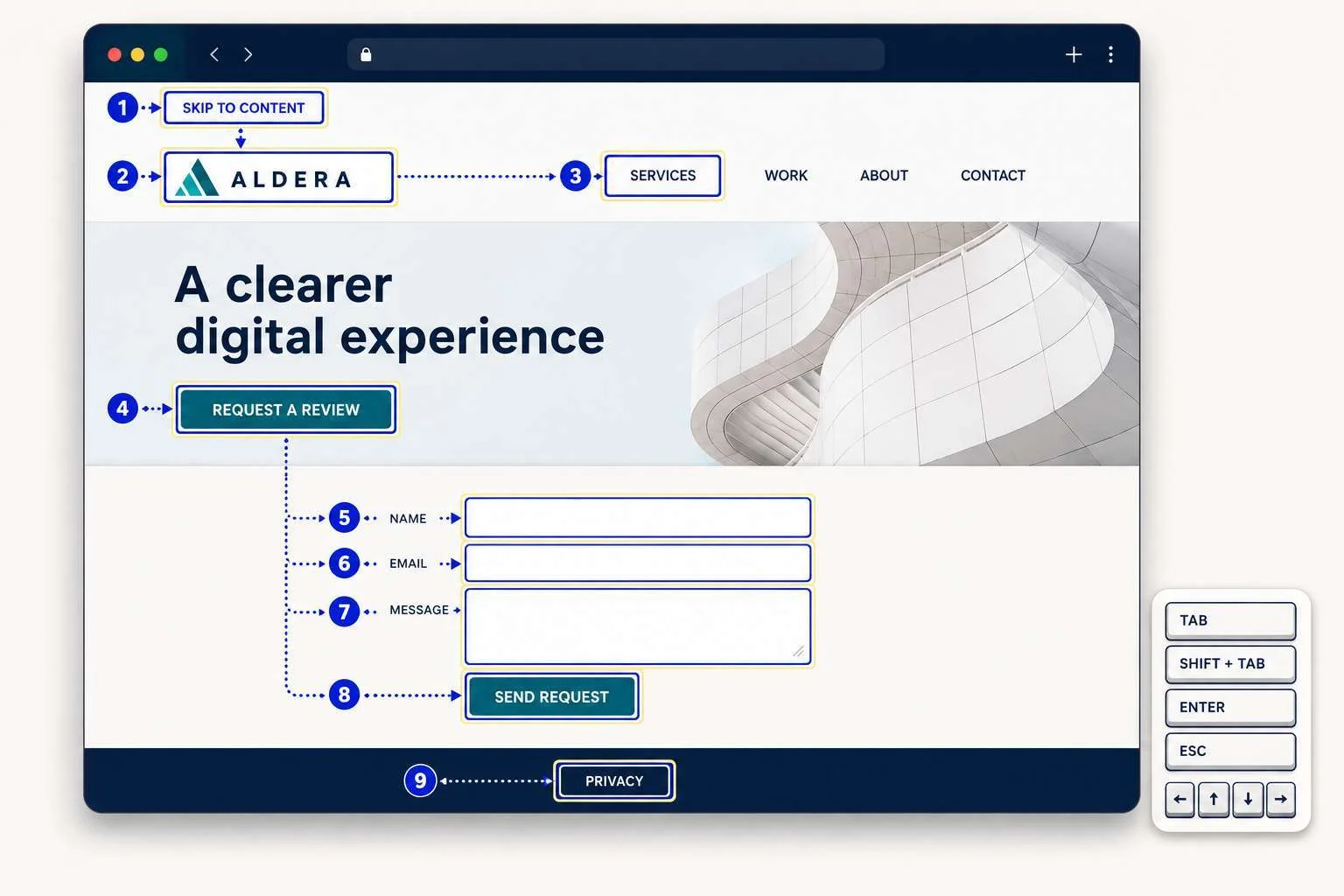
Start at the address bar and use Tab, Shift plus Tab, Enter, Escape and arrow keys. You should be able to reach and operate menus, links, buttons, forms and dialogs. Focus should remain visible, follow a logical order and never become trapped.
Check for a working skip link, meaningful headings, labelled fields, readable contrast, clear link styling and content that still works when text is enlarged. WCAG 2.2 includes requirements for keyboard operation, visible focus, contrast and reflow. The WCAG 2.2 standard is the authority for detailed requirements.
The WordPress accessibility ready label is valuable, but it is a minimum theme review standard, not a claim that a finished site conforms to WCAG at level AA. Any credible process for how to choose a WordPress theme must still test the finished experience. Plugins, content and later customisation can introduce barriers. WordPress states this limitation in its theme accessibility guidance.
7. Test editing and theme compatibility
Create, edit, duplicate and delete the content your team handles most often. Confirm that the editor resembles the front end closely enough to avoid guesswork. Try the required form, commerce, multilingual, analytics and SEO plugins, and check browser logs and WordPress debugging output for errors.
Finally, switch temporarily to a default WordPress theme in the test environment. This portability check is a practical part of how to choose a WordPress theme for long term ownership. Core content should remain. If essential text, calls to action or product information disappears because it lives inside theme specific shortcodes or widgets, you have found a future migration cost.
What an SEO friendly WordPress theme really means
An SEO friendly WordPress theme provides clean, understandable output. It should support meaningful headings, crawlable navigation, descriptive link text, responsive layouts and templates that do not hide primary content behind interaction. It should also cooperate with your chosen SEO plugin instead of producing duplicate titles, canonical tags or structured data.
No theme can guarantee rankings. Understanding that limit is part of how to choose a WordPress theme without being distracted by vague SEO claims. Google’s Search Essentials focus on accessible content, crawlable links and useful information, not a particular theme brand. Search performance also depends on content quality, internal linking, authority, technical configuration and competition.
If organic visibility is commercially important, combine theme selection with a wider technical SEO review. This catches indexing, template and structured data issues that a visual inspection will miss.
Theme compatibility, support and ownership
Theme compatibility means more than an icon row on a sales page. Compatibility changes how to choose a WordPress theme because a failure in checkout, forms or language handling can outweigh a modest speed advantage. Test the exact plugin workflows the business relies on. For WooCommerce, inspect product variations, account pages, basket notices, checkout errors and small screen behaviour. For multilingual sites, test language switching, longer translated labels and right to left layouts where relevant.
Support quality becomes important after a WordPress update, not during the demo. Support evidence belongs in how to choose a WordPress theme because unresolved faults create business risk. Look for a clear update policy, useful documentation, maintained release notes and a way to report security or compatibility problems. A one time purchase can be poor value if updates stop, while an annual licence may be reasonable when it funds active maintenance and reliable help.
Ownership is the final test. Keep domains, hosting, theme licences and recovery access under the business’s control. Record which features require renewal and what happens if a licence expires. Verify the specific vendor terms before purchase.
WordPress theme checklist for speed, SEO and accessibility
Use this shortlist after the practical tests. A candidate does not need the highest score in every row, but any serious failure should have an owner, cost and resolution plan.
| Area | Pass when | Reconsider when |
|---|---|---|
| Business fit | Required page types work without unnecessary extras | The theme needs heavy custom work for basic content |
| Performance | Representative pages compare well across repeated mobile tests | Simple pages load large unused theme assets |
| Responsive design | Content works across narrow screens, zoom and long labels | Navigation, forms or columns break between presets |
| Accessibility | Keyboard use, focus, contrast, reflow and forms work | Core navigation cannot be used without a mouse |
| SEO | Output is crawlable, structured and compatible with the SEO plugin | Titles, canonicals or schema are duplicated |
| Editing | Routine updates are clear for the actual team | Editors need frequent developer help |
| Compatibility | Required plugins and workflows pass staging tests | Compatibility is claimed but not demonstrated |
| Ownership | Content remains portable and licences are understood | Essential content is locked inside theme features |
| Maintenance | Updates, documentation and support are current | The changelog is stale or support is unclear |

A practical recommendation for each decision maker
Your role changes how to choose a WordPress theme because each team carries a different part of the long term cost.
Business owners should prioritise clear editing, current support and a limited feature set. A reputable free theme can be enough for a straightforward site. Pay for a premium theme when a required feature, support level or time saving template justifies the licence.
Marketers should test the real publishing workflow. Look for reusable patterns, reliable forms, sensible responsive controls and enough flexibility for campaigns without giving every editor unrestricted design control.
Developers should inspect asset loading, semantic output, hooks, templates, theme.json, build requirements and update practices. They should also estimate the cost of overriding the theme versus choosing a simpler foundation. If more than a few core templates need extensive correction, the apparent saving may disappear quickly.
Final Thoughts
The right answer to how to choose a WordPress theme is not the theme with the most demos or the highest score from one test. It is the candidate that meets the business requirements, performs well with representative content, remains usable on mobile and by keyboard, works with the required plugins and keeps content portable.
Shortlist two or three options, place them in the same controlled environment and record the evidence. That small investment is cheaper than rebuilding around a theme that looked good but failed under real work.
Not sure whether your current theme is helping or holding the site back? Request a website review from Mahmud Jibon for a practical assessment of performance, usability, SEO, accessibility and maintainability.
Frequently asked questions
How do I know if a WordPress theme is fast?
Install it in a controlled test site with representative content and the plugins you expect to use. Run repeated mobile tests across several page types, then inspect loaded theme assets. A fast demo alone is not enough.
How to choose a fast WordPress theme for business use?
Begin with the site’s essential content and functions, then choose the simplest theme that supports them. Test a service page, article, form and any commercial workflow under the same conditions. Give extra weight to editing clarity, support and content portability because those costs continue after launch.
Is a block theme always faster than a classic theme?
No. Block theme performance can benefit from structured global settings and styles loaded for individual blocks, but implementation still decides the result. Test the specific candidates rather than assuming one theme type will win.
Should I buy a premium theme?
Buy one when a required capability, maintained template or dependable support saves more time than the licence costs. A reputable free theme can be the better option for a simple business website. Confirm renewal terms and update access before paying.
Does an accessibility ready theme make the whole site compliant?
No. The label shows that the theme meets the WordPress review baseline for that tag. Your content, plugins, colour choices, forms and custom code still require testing against the accessibility standard relevant to your organisation.
Can changing a theme improve WordPress speed?
Yes, when the current theme loads unnecessary assets or creates inefficient templates. The improvement may be limited if slow hosting, oversized media, heavy plugins or third party scripts are the main cause. Measure the current bottleneck before planning a redesign.