
Choosing between Shopify vs WooCommerce becomes harder once a store has real growth plans. A cheap launch can become expensive to maintain, while a flexible build can become difficult to update as the catalogue, team, markets, and fulfilment process expand.
This comparison covers cost, ownership, maintenance, checkout, customisation, content, security, and integrations. It will help you identify which platform gives your business the right balance of control and operational simplicity.
Shopify vs WooCommerce: the short answer
Shopify is usually stronger for a retailer that wants hosted ecommerce, a controlled checkout, centralised support, and fewer infrastructure decisions. WooCommerce is often better when the business needs deeper control over code, content, data, or unusual product logic.
The right Shopify vs WooCommerce decision depends less on company size than on operating model. WooCommerce freedom is valuable, but someone must own hosting, updates, backups, security, testing, and troubleshooting. Shopify reduces that burden, though the business must accept platform boundaries.
The fundamental platform difference
Shopify is hosted software. Its subscription covers the commerce platform and hosting, while Shopify manages core infrastructure and platform updates. Merchants configure the store and work within the service’s capabilities.
WooCommerce is a WordPress commerce plugin. The merchant selects the hosting, theme, extensions, payment tools, security measures, and maintenance process. Woo confirms that the core remains an open source and extendable product. The exchange is clear. Shopify reduces technical responsibility, while WooCommerce gives more control and more ownership of risk.

Shopify vs WooCommerce comparison at a glance
| Decision area | Shopify | WooCommerce |
|---|---|---|
| Hosting | Included and managed by the platform | Selected and managed by the merchant or agency |
| Core software | Subscription service | Free open source WordPress plugin |
| Maintenance | Core platform maintenance is handled by Shopify | WordPress, WooCommerce, theme, and plugin updates need active management |
| Customisation | Strong theme and app ecosystem within platform rules | Broad access to code, database, plugins, and hosting stack |
| Checkout | Standardised, secure, and tightly managed | More directly customisable, with greater testing responsibility |
| Support | Central platform support, plus app and developer support | Support may be split between host, theme, plugin vendors, and developer |
| Cost pattern | More predictable base subscription, with variable app and transaction costs | Flexible base cost, with variable hosting, extension, maintenance, and development costs |
| Best fit | Teams prioritising speed, stability, and operational simplicity | Teams prioritising control, custom logic, and WordPress flexibility |
This Shopify feature comparison is a starting point, not a buying decision. Two stores with the same revenue can need completely different systems because one has a standard retail journey while the other relies on complex pricing, memberships, subscriptions, or product configuration.
Cost and feature comparison for Shopify vs WooCommerce
The starting price says little about the cost of a growing store. A useful Shopify pricing comparison includes the platform, payments, apps, development, maintenance, and staff time.
What Shopify really costs
Shopify charges a recurring subscription. Plans, rates, and promotions can vary by country and billing cycle, so check the official Shopify pricing page before publication and commitment.
Budget for any paid theme, apps, custom work, international selling, point of sale needs, and payment processing. Shopify may add transaction fees when a third party payment provider is used. Its transaction fee guidance explains when they apply. Global sellers should also confirm whether Shopify Payments operates in their country or region.
What WooCommerce really costs
The WooCommerce plugin has no licence fee, but a production store still needs a domain, suitable hosting, extensions, design, payment processing, backups, security, development, and maintenance.
Woo publishes current server recommendations covering WordPress, PHP, the database, HTTPS, and memory. Cheap hosting may not suit a busy catalogue or a concentrated promotion. WooCommerce can cost less with a lean stack and capable team, then become expensive when plugin conflicts or server work arrive without a maintenance budget. Woo’s cost planning tool is more useful than judging the free plugin alone.
Compare three year ownership, not month one
Build a three year estimate using the same requirements. Include paid tools, integrations, maintenance, payment fees, internal time, and a migration contingency. A standard retail store may pay more in visible Shopify subscriptions but spend less time coordinating vendors. A content rich retailer with custom bundles and a WordPress team may gain more from WooCommerce control.

Setup and daily store management
Shopify setup is more contained. Hosting, administration, products, checkout, and core sales functions arrive as one system. The team still configures taxes, shipping, policies, payments, analytics, redirects, and permissions.
WooCommerce starts with a WordPress environment. The team selects hosting, assembles and tests the commerce stack, sets up backups, secures access, and creates an update process. With Shopify vs WooCommerce, ask who diagnoses a failed integration, restores a backup, and tests changes before a major sale. If the answer is unclear, operational simplicity deserves more weight.
Features, design, and integrations
Both platforms support common retail functions. The useful question is whether each required feature is native, added by a third party, or dependent on custom development.
Shopify strengths and limits
Shopify uses a consistent commerce workflow. Themes and apps cover common needs such as reviews, subscriptions, loyalty, search, bundles, and fulfilment. Behaviour outside the platform model may require an app, API integration, custom theme work, or higher plan. Map every requirement to a confirmed implementation and test it with realistic data.
If Shopify is the likely fit, review Mahmud Jibon’s Shopify development service to understand the planning, design, testing, and launch work involved beyond opening an account.
WooCommerce strengths and limits
WooCommerce gives direct access to the WordPress application, theme, plugins, database, and hosting. It suits unusual catalogues, content heavy sites, custom product logic, and specialist integrations. A store assembled from overlapping plugins can become fragile, so use fewer maintained extensions, document custom code, and test changes on a staging site.
Integrations need evidence, not logos
Confirm which records an integration moves, in which direction, how frequently, and how conflicts are handled. Test refunds, partial fulfilment, cancelled orders, taxes, discounts, back orders, and edited addresses. Integration limits usually appear in exceptions, not the perfect demonstration order.

Performance, security, and support
Shopify removes most server administration from the merchant. A theme can still suffer from heavy scripts, media, or unnecessary apps. WooCommerce performance depends on hosting, caching, database health, theme quality, plugins, and configuration. It can perform well, but the result must be engineered and maintained.
Shopify says its Level 1 PCI DSS compliance extends to all Shopify stores. Merchants still need secure accounts, sensible permissions, and trustworthy apps. WooCommerce states that PCI DSS compliance is ultimately the store owner’s responsibility. Review its PCI guidance with the host and payment provider.
Support follows the architecture. Shopify provides one central platform relationship, though apps and custom code may involve other vendors. WooCommerce support may be divided among the host, developer, theme, gateway, and extension vendors. Keep a written escalation path.
SEO, content, and store ownership
Neither platform receives a guaranteed search advantage. Results depend on crawlability, useful content, structure, product information, internal linking, speed, reputation, and shopping experience.
Shopify provides a practical SEO foundation and consistent structure, although some URL patterns are less flexible than WordPress. The guide to improving Shopify conversions is useful once traffic begins arriving. WooCommerce suits extensive editorial content, custom taxonomies, resource libraries, and unusual information architecture, but poor governance can create duplicate archives and uncontrolled templates.
WooCommerce gives the business direct control of its files and database on the chosen host. Shopify lets merchants export important records and download a theme, but the hosted platform is not portable. Shopify documents its CSV export options and the limits of backing up or duplicating a store. Keep product media, domain control, analytics access, integration notes, and scheduled exports on either platform.
Which option is better for growing online stores?
Choose Shopify when growth means more orders, more channels, more staff, and more markets within a broadly standard retail model. It is especially sensible when the business wants predictable platform operations and does not employ people who enjoy maintaining WordPress infrastructure.
Choose WooCommerce when growth depends on content depth, custom data structures, specialised buying logic, or control over the hosting and application layer. It is a strong fit when WordPress is already central to the business and technical maintenance is treated as a normal operating function.
A high revenue figure does not settle Shopify vs WooCommerce. Complexity, internal capability, margin structure, payment availability, and appetite for platform dependence are more useful signals.
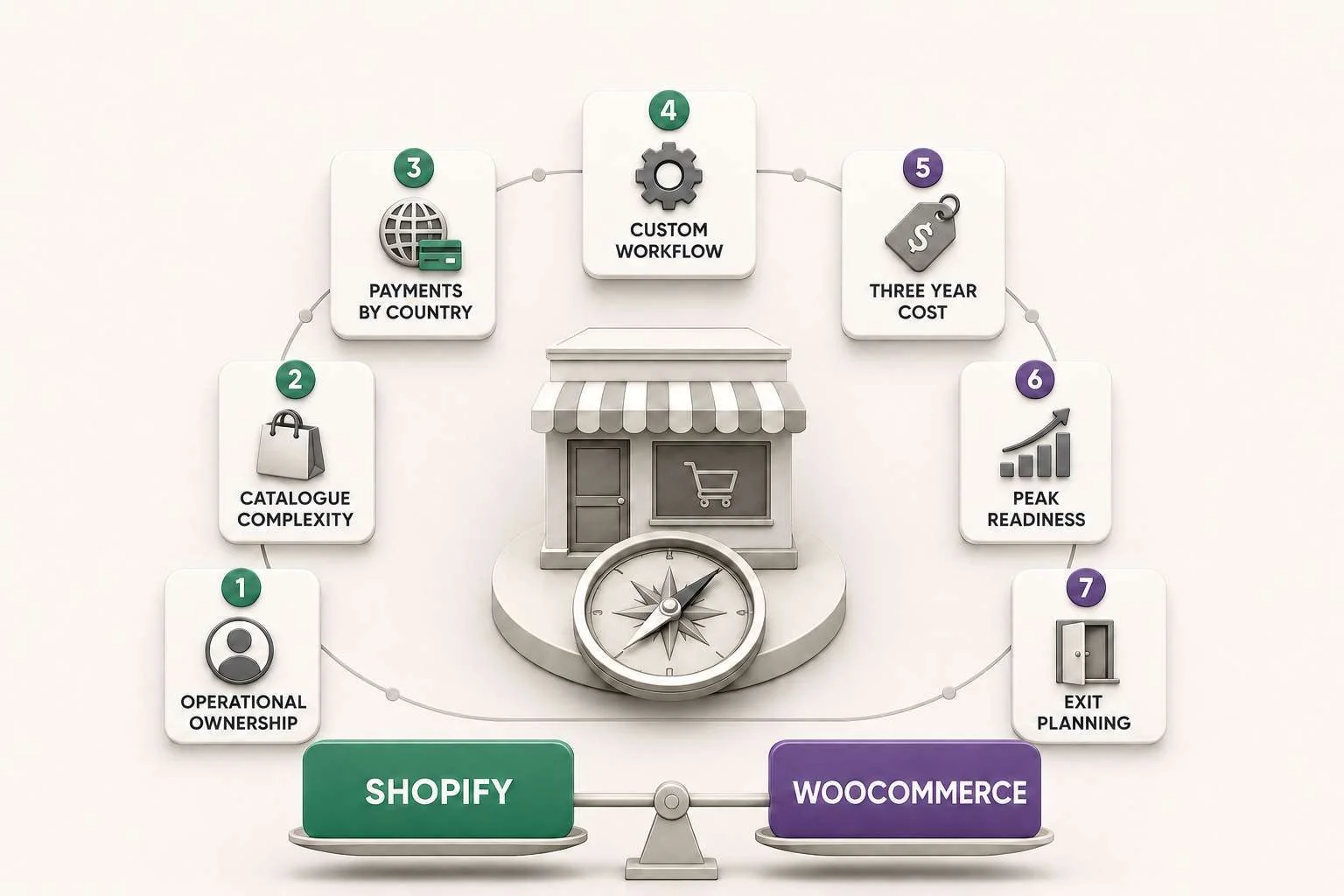
Seven tests for a confident ecommerce platform decision
- Name the operational owner. Decide who handles products, apps, backups, security, updates, failed orders, and vendor support.
- Model the real catalogue. Include variants, bundles, subscriptions, personalisation, wholesale rules, regional pricing, and future product types.
- Verify payments by country. Confirm gateway availability, settlement currency, processing fees, refunds, fraud tools, and any additional platform fee.
- Prototype the hardest workflow. Test the requirement most likely to expose a platform limit, not the easiest product page.
- Calculate three year cost. Include software, apps, extensions, hosting, development, maintenance, internal time, and a migration contingency.
- Test peak operations. Review traffic capacity, inventory accuracy, fulfilment exceptions, customer support, and rollback plans.
- Plan the exit. Identify what can be exported, what needs rebuilding, who controls the domain, and how redirects and historical data would move.
Common mistakes when comparing the platforms
Do not treat the free WooCommerce plugin as the complete cost, or assume Shopify removes every technical problem. Themes, apps, feeds, integrations, hosting, and maintenance still need competent decisions.
Document business requirements before selecting tools. A stack that looks capable may fail at refunds, tax exceptions, or inventory synchronisation. Treat guaranteed loss free migration claims carefully. Use export tests, field mapping, redirects, crawl checks, order reconciliation, and a rollback plan.
Launch strategy after the platform choice
Once Shopify vs WooCommerce is settled, freeze the required features, assign owners, confirm integrations, prepare content, and test the complete order journey on mobile and desktop.
Try an invalid discount, declined payment, partial refund, out of stock item, address correction, and delayed fulfilment update. Confirm taxes, shipping, notifications, analytics, privacy controls, and permissions. Launch to a controlled audience when possible, then improve the store from support questions and failed actions.
Final Thoughts
Shopify is the better default for a growing store that values fast setup, managed infrastructure, centralised commerce tools, and a lower maintenance burden. WooCommerce is the better option when control, customisation, content architecture, and direct access to the technical stack justify the extra responsibility.
The strongest Shopify vs WooCommerce choice is the one your team can operate reliably for the next three years. Price the complete system, test the difficult workflows, confirm payments in every target market, and be honest about who will maintain it. That will produce a more durable answer than any universal platform ranking.
Plan your Shopify store project
If Shopify fits your operating model, contact Mahmud Jibon to plan your Shopify store project. Bring your catalogue, target markets, required integrations, launch date, and current pain points so the project can be scoped around real business requirements.
Frequently asked questions
Shopify vs WooCommerce: which platform is better for a growing store?
Shopify is usually better when a growing team wants managed hosting, a consistent administration experience, and fewer maintenance duties. WooCommerce is often better when the store needs deep customisation or already has strong WordPress capability. The right answer depends on operations and complexity, not revenue alone.
Is WooCommerce cheaper than Shopify?
It can be, but the free plugin does not represent total cost. Compare WooCommerce hosting, extensions, security, maintenance, and development with Shopify subscription, apps, payment charges, and development. Use the same requirements and a three year period.
Can Shopify handle a large or complex catalogue?
Shopify can support substantial catalogues, but complexity matters more than product count. Confirm variant structures, bundles, subscriptions, regional rules, search, inventory, and integrations with realistic sample data before choosing a plan or app stack.
Is WooCommerce more flexible than Shopify?
WooCommerce generally provides more direct technical control because the business can access and modify the WordPress code, database, plugins, and hosting environment. That flexibility creates more testing and maintenance work, so it is most valuable when the team has a clear custom requirement.
Which platform is better for SEO?
Both can support strong organic visibility. WooCommerce offers more control over WordPress content and structure, while Shopify provides a consistent technical foundation that is easier for many teams to govern. Content quality, crawlability, internal linking, speed, and authority matter more than the platform label.
When to choose each option for a Shopify project?
Choose Shopify when the project can work within its commerce model and the business values managed operations. Consider WooCommerce instead when discovery reveals essential custom workflows, content structures, or ownership requirements that Shopify cannot meet sensibly within the available plan and budget.