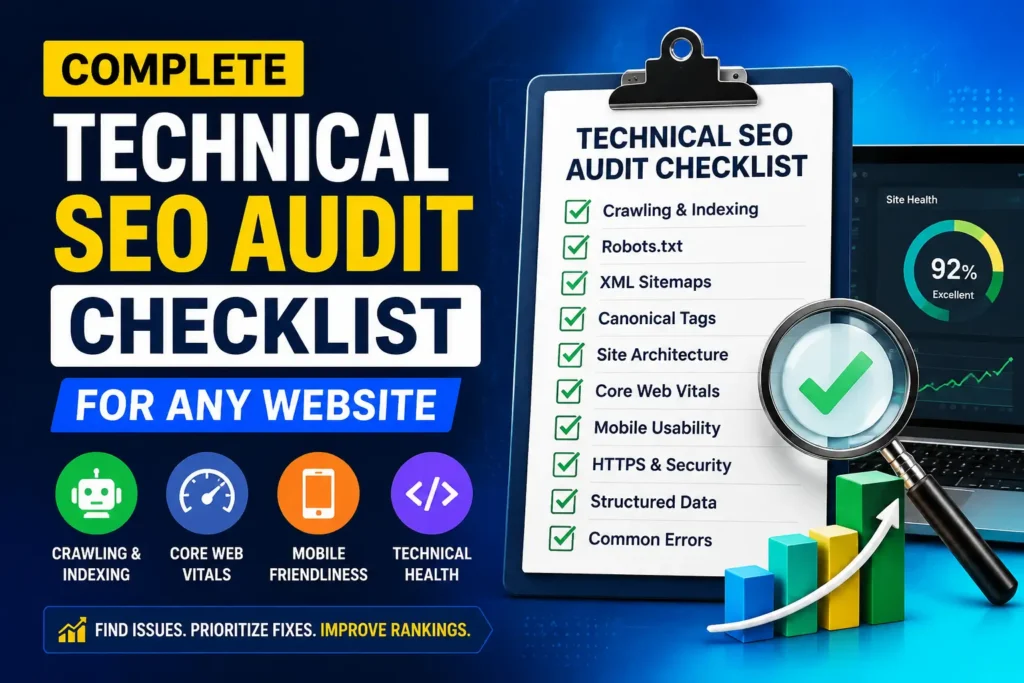
A website can look polished, publish strong content, and still lose organic visibility because search engines cannot crawl, render, interpret, or index it reliably. A technical SEO audit checklist helps you find those hidden failures before they become traffic losses, migration problems, or expensive development work.
This guide explains how to review a website step by step, collect reliable evidence, and turn crawler warnings into a prioritised implementation plan. It applies to business websites, ecommerce stores, publishers, international sites, and JavaScript applications.
What a technical SEO audit should prove
A technical audit is not a hunt for the largest possible number of warnings. Its purpose is to answer four practical questions.
First, can search engines discover the URLs that matter? Second, can they access and render the important content? Third, are the correct pages eligible for indexing? Fourth, does the site send consistent signals about which URLs should rank?
Google states that a page must be accessible to Googlebot, return a successful response, and contain indexable content to meet its minimum technical requirements. Meeting those conditions does not guarantee indexing or rankings, but failing any one of them can stop a page before content quality is even considered. Review the official Google Search technical requirements before applying any technical SEO audit checklist to a live website.
A good audit connects technical evidence to commercial impact. A blocked privacy policy is rarely as urgent as a blocked product category. Context decides priority.

Audit preparation and data access
Check 1. Define the audit scope and business goals
Record the site type, conversion paths, target countries, platform, recent migrations, and known traffic changes. Identify the page groups that create business value.
A small brochure site can be reviewed manually alongside a crawl. A store with millions of parameter URLs needs sampling, log analysis, and template level checks.
Check 2. Secure access to the right evidence
Collect access to Search Console, analytics, the platform, server or CDN settings, and a reliable crawler. Search Console shows Google evidence, while a crawler shows site responses. Neither view is complete alone.
Use URL Inspection on representative templates, not only the homepage. Google explains that Search Console provides crawl, index, and serving information directly from its index.
For related services and implementation support, review Mahmud Jibon’s search engine optimisation service.
Check 3. Configure the crawl before trusting the results
Decide whether the crawler should respect robots.txt, render JavaScript, crawl subdomains, and include parameters. A standard crawl may reveal architecture problems, while a rendered crawl may expose script dependent content.
Document the user agent, speed, authentication, and starting URLs. Poor settings can produce misleading conclusions.
Technical SEO audit checklist for crawlability and discovery
Check 4. Review robots.txt rules
Open robots.txt on every relevant host. Look for broad blocks, blocked assets, and staging rules left on production.
Robots.txt controls crawling, not guaranteed removal from the index. Google specifically advises using a noindex rule or access control when the goal is to prevent indexing. A URL blocked from crawling can still appear without a useful snippet if Google discovers it elsewhere. Compare your rules with Google’s robots.txt introduction and noindex guidance.
Common error: A redesign launches with a staging disallow rule still active, preventing deeper pages from being refreshed.
Check 5. Confirm that important links are crawlable
Navigation, breadcrumbs, pagination, and contextual links should use anchor elements with an href value. Script only buttons may not provide a dependable discovery path.
Google says it can generally crawl links when they use an anchor element with an href attribute. Review the official crawlable link guidance when auditing menus, card layouts, accordions, and application routes.
Check 6. Find orphan pages and weakly connected sections
Compare crawl URLs with sitemaps, analytics landing pages, Search Console, and platform exports. Missing URLs may be orphaned, blocked, or accessible only through forms.
Orphan status is not always bad. The concern is an indexable commercial page that depends on a sitemap alone and receives no internal support.
Check 7. Identify crawl traps and uncontrolled URL spaces
Faceted navigation, calendars, onsite search, tracking parameters, session identifiers, sorting options, and endlessly generated combinations can create far more URLs than the site has useful content.
Do not block every parameter blindly. Some filters have search demand, while sorting URLs usually add no independent value. The technical SEO audit checklist should separate useful landing pages from duplicate combinations, then align links, canonicals, robots rules, and sitemaps.
Google provides dedicated crawl budget guidance for very large or frequently updated sites. Small sites rarely need crawl budget work.

Indexability and canonical control
Check 8. Audit HTTP status codes
Group URLs by response code and business importance. Indexable pages should normally return 200, permanent moves should redirect permanently, and removed pages without a replacement should return 404 or 410.
Google treats 301 and 308 as strong canonical signals, while 302 and 307 are weaker. Googlebot generally follows up to ten hops, but chains still slow users and complicate maintenance. Persistent 5xx and 429 responses can reduce crawling. See Google’s HTTP status code documentation.
Check 9. Review index directives
Export meta robots and X Robots Tag directives. Find accidental noindex rules, conflicts, and noindexed pages still listed in sitemaps.
A noindex page must remain crawlable long enough for Google to see the directive. Blocking it in robots.txt can prevent that. Also check whether JavaScript changes the robots tag after load.
Check 10. Test canonical tags and canonical consistency
Every indexable page needs a clear canonical strategy. Self references help, but they do not repair contradictory signals.
Compare the declared canonical with redirects, internal links, sitemaps, hreflang, protocol, hostname, and Google’s selected canonical. Google describes redirects as a strong signal and recommends internal links to the canonical URL. Review the canonical URL guidance.
Common error: A page self canonicalises, while navigation and the sitemap use different variants. The surrounding signals remain confused.
Check 11. Validate XML sitemaps
A sitemap should contain canonical, indexable, successful URLs. Remove redirects, blocks, noindex pages, duplicates, and errors. Keep modification dates accurate.
Google limits a single sitemap to 50,000 URLs or 50 MB uncompressed. Larger sites should use multiple files and a sitemap index. Review Google’s sitemap creation guidance before publication.
Segment sitemaps by template so indexing problems are easier to isolate.
Check 12. Reconcile crawl data with Google’s index reports
Crawled, sitemap, and indexed URL totals will not match perfectly. Some exclusions are normal.
Investigate patterns rather than every exclusion. Repeated “Crawled, currently not indexed” results may signal duplication, weak linking, rendering problems, or delayed processing.

Architecture, URLs, and redirects
Check 13. Review URL structure and consistency
URLs should be stable and predictable. Check case, encoded characters, duplicate paths, trailing slashes, mixed protocols, and hostnames.
Avoid changing URLs only for appearance. Change them when the structure causes duplication, misrepresents content, or creates crawling problems.
Check 14. Measure click depth and internal importance
Important pages need clear internal paths. Click depth is not a ranking formula, but it reveals hierarchy and importance.
Review pages that require many steps from a relevant category. Some are specialised, while others are buried by poor navigation.
A well planned website structure also supports usability and conversion. Mahmud Jibon’s WordPress agency website checklist provides related guidance for building clearer service journeys.
Check 15. Remove redirect chains and irrelevant destinations
Map internal redirects and update links to the final destination. Review chains, loops, protocol changes, and old migration rules.
Redirect old URLs to the closest relevant replacement. Sending unrelated pages to the homepage may create soft 404s. Keep rules that still serve external links or bookmarks.
Check 16. Test pagination and incremental loading
Pagination should expose crawlable links. Infinite scroll still needs stable URLs for later content.
Check that later pages return distinct content, use sensible canonicals, and remain discoverable without interaction.
JavaScript rendering and content access
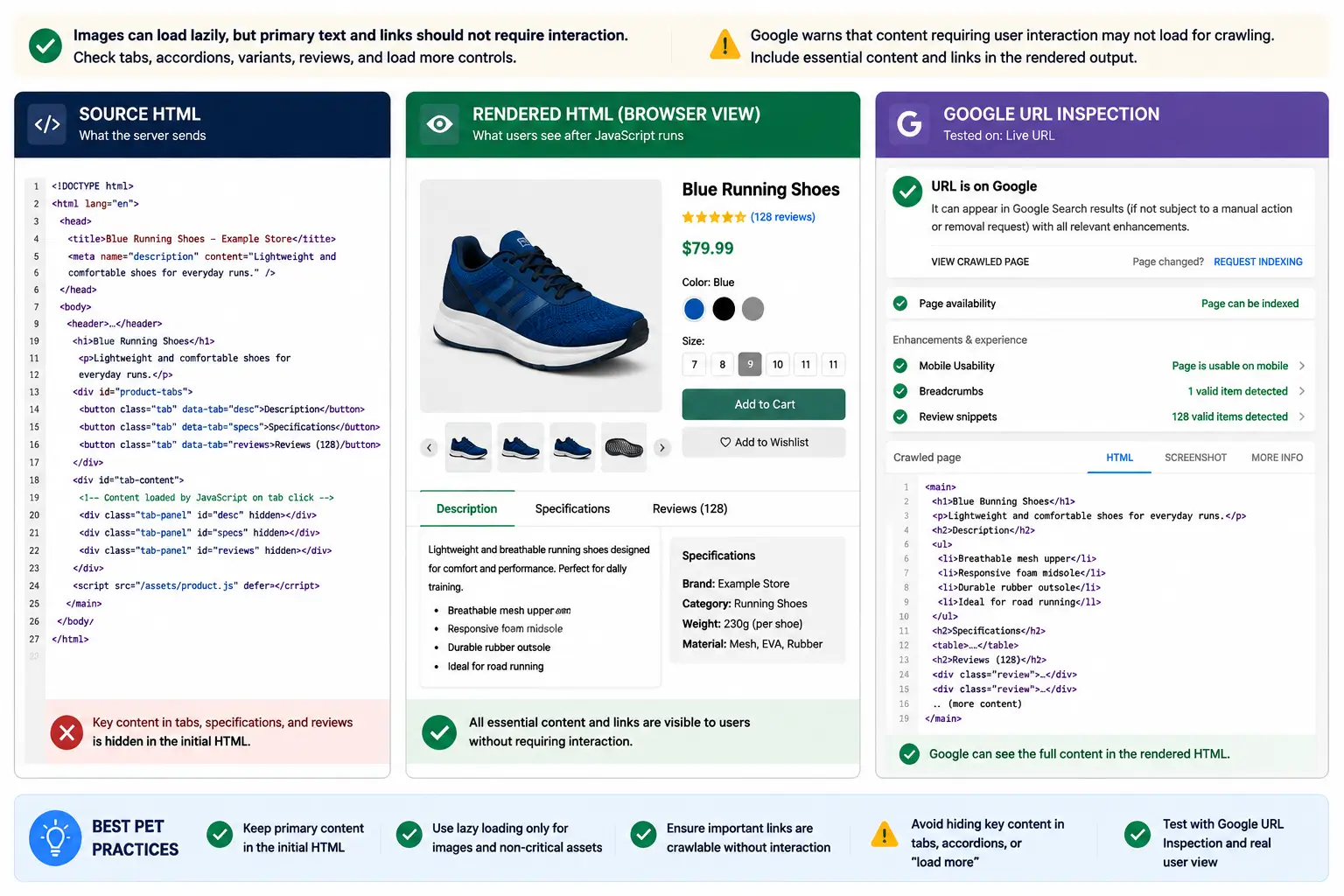
Check 17. Compare source HTML with rendered HTML
Inspect key content and directives in both source and rendered HTML. A rendered crawler helps, but validate important examples with Search Console and developer tools.
Google renders JavaScript using its web rendering systems, yet differences and limitations still matter. Review Google’s JavaScript SEO basics and JavaScript troubleshooting guidance.
Check 18. Test application routes and JavaScript links
Each valuable application view should have a stable URL, useful direct response, and crawlable links.
Test hard refreshes and copied URLs. A route that works only after homepage entry may fail for crawlers and shared links.
Check 19. Confirm that lazy content loads without interaction
Images can load lazily, but primary text and links should not require interaction. Check tabs, accordions, variants, reviews, and load more controls.
Google warns that content requiring user interaction may not load for crawling. Include essential content and links in the rendered output.
Core Web Vitals and page performance
Check 20. Separate field data from laboratory tests
Field data reflects real users. Laboratory tests are controlled and useful for diagnosis, but a strong lab score can still hide poor real user performance.
Use Search Console and Chrome User Experience Report data for trends, then laboratory tools for diagnosis. Current Core Web Vitals are LCP, INP, and CLS, assessed at the seventy fifth percentile.
Check 21. Diagnose Largest Contentful Paint
A good LCP is 2.5 seconds or less. Identify the LCP element, then examine server response, blocking resources, image discovery, caching, fonts, and client rendering.
The cause may be a slow origin, late script request, hidden hero image, or delayed stylesheet. Hosting also affects response time. See WordPress hosting for international business for infrastructure context.
Check 22. Diagnose Interaction to Next Paint
A good INP is 200 milliseconds or less. Investigate long tasks, heavy scripts, event handlers, and large document updates.
Third party scripts deserve scrutiny, but some are commercially required. Test delayed loading, reduced scope, and vendor configuration before removal.
Check 23. Diagnose Cumulative Layout Shift
A good CLS is 0.1 or less. Reserve image dimensions, stabilise fonts, avoid late banners, and test consent notices.
Layout movement is often template specific, so audit page groups rather than one URL.

Mobile, HTTPS, and security checks
Check 24. Confirm mobile content and metadata parity
Google uses mobile content for indexing and ranking. Compare mobile and desktop content, links, data, directives, and canonicals. Responsive design is generally easier to maintain.
Collapsible mobile sections are acceptable when content remains present. Omitted content is the problem.
Check 25. Review HTTPS, mixed content, and security responses
Use HTTPS consistently. Check certificates, redirects, mixed content, canonicals, sitemaps, and internal links.
Unexpected redirects, injected canonicals, spam pages, or sudden index changes may indicate compromise. Review logs and Search Console security reports.
Page signals, structured data, and international SEO
Check 26. Audit titles, headings, images, and structured data
Check unique titles, a clear main heading, descriptive alt text, and metadata that matches visible content.
Validate markup with Google’s structured data tools. It should describe visible content and follow type requirements. Correct markup creates eligibility, not a guarantee.
Review broken images, oversized files, missing dimensions, blocked resources, and descriptive alt text.
Check 27. Validate hreflang and international targeting
International sites should use distinct URLs and complete hreflang clusters. Every reference should be valid, canonical, and indexable.
Avoid automatic redirects based only on location or browser language. Google recommends separate URLs and hreflang for variants. Review its international site guidance.

Common errors found during a technical SEO audit checklist review
A common failure is treating every crawler warning equally. A blocked revenue page matters more than an intentionally noindexed checkout page.
Another mistake is applying one rule everywhere. Blocking all filters can remove useful pages, while indexing every filter creates duplication.
A useful finding identifies affected templates, examples, current and expected behaviour, impact, owner, and validation method.
Fix the generator, not only the symptom. Technical SEO audit checklist best practices focus on systems and templates, not isolated cleanup.
How to prioritise the technical SEO audit checklist
Use this technical SEO audit checklist priority model for every finding.
- Impact. Which pages, markets, and conversions are affected?
- Confidence. What evidence proves the issue, and how certain is the expected benefit?
- Effort. Does the fix require a content edit, template change, server work, or platform rebuild?
- Risk. Could the change remove indexed pages, break navigation, alter tracking, or affect revenue?
Urgent findings include sitewide noindex rules, blocked critical sections, widespread 5xx errors, broken migration canonicals, redirect loops, missing mobile content, and compromise.
Medium priority findings include weak links, redirect chains, template duplication, incomplete markup, and Core Web Vitals failures.
Low priority findings include harmless legacy URLs and warnings on intentionally excluded pages. They can wait until higher value risks are controlled.
Technical SEO audit checklist implementation and validation
The technical SEO audit checklist is complete only when fixes are verified. Create tickets with examples, acceptance criteria, owners, dependencies, and rollback notes.
Test in staging, while recognising that CDN rules, live data, consent scripts, and integrations may behave differently in production.
Before release, crawl changed templates, inspect rendering, test mobile layouts, validate markup, and confirm tracking. Repeat the checks on production and monitor Search Console, logs, uptime, and conversions.
For WordPress projects, the international hosting guide explains how backups, staging, caching, and resources affect implementation.
Run lighter reviews after releases and fuller audits at sensible intervals. Ecommerce sites may need continuous checks, while stable service sites may suit quarterly review.
Final Thought
The best technical SEO audit checklist shows whether search engines can discover, render, and index the right pages, then connects each failure to value, effort, and risk.
Start with access, status codes, directives, canonicals, and sitemaps. Then review architecture, rendering, performance, mobile parity, markup, and international signals. Fix systems, validate releases, and document changes.
Book a technical SEO audit with Mahmud Jibon to uncover crawl, indexing, rendering, performance, and website architecture issues, then receive a prioritised plan your team can act on. Contact Mahmud Jibon.
Frequently asked questions
What is included in a complete technical SEO audit checklist for any website?
A complete review covers crawling, links, status codes, directives, canonicals, sitemaps, architecture, redirects, rendering, Core Web Vitals, mobile, HTTPS, markup, and international signals. Depth should match the site’s size and risk.
How do I review a technical SEO audit checklist step by step?
Begin with goals and access. Crawl the site, compare results with Search Console and sitemaps, inspect templates, prioritise findings, implement controlled changes, and validate production.
Which technical SEO audit checklist common errors are most serious?
Sitewide noindex rules, blocked commercial sections, server errors, redirect loops, contradictory canonicals, broken mobile content, and compromise are usually urgent.
Can I complete a technical SEO audit without paid tools?
A small site can be reviewed with free Google tools, developer tools, manual checks, and a limited crawler. Larger sites benefit from scalable crawling, logs, exports, and monitoring.
How often should a technical SEO audit be completed?
Review after migrations, redesigns, domain changes, and major releases. Large stores may need continuous monitoring, while stable sites can often use quarterly reviews.
Does fixing every technical SEO issue improve rankings?
No. Some warnings affect intentionally excluded pages. Technical fixes remove obstacles, but rankings also depend on relevance, content, competition, links, reputation, and user needs.